
Can LinkedIn sync messages to a CRM on its own?
Only through Sales Navigator, and only if you're on its top tier. CRM Sync and activity writeback both need an Advanced Plus seat for every sales person, and the CRM licence still comes on top of that. What it records is what people do inside Sales Navigator, sent InMails and messages for example, which isn't the same thing as your regular LinkedIn inbox. Plenty of people assume it mirrors the inbox. It doesn't.
| CRM | Native LinkedIn option | What it needs | What it writes to the CRM | Cost per rep |
|---|---|---|---|---|
| HubSpot | Sales Navigator CRM Sync, available for HubSpot since 2024 | Sales Navigator Advanced Plus per rep; HubSpot lists a Sales Hub Professional or Enterprise seat | Sales Navigator activity such as InMails and messages | Advanced Plus: sold by quote, from about $1,600 a year. Sales Hub Professional: $90 a month billed yearly ($100 monthly) plus a one time $1,500 onboarding fee. About $2,700 a year before onboarding |
| Salesforce | Sales Navigator for Salesforce with CRM Sync | Advanced Plus per rep plus a Salesforce edition with API access: Enterprise, Unlimited or Performance, or Pro Suite with the API add on | Sales Navigator activity, as Salesforce activities | Advanced Plus from about $1,600 a year. Sales Cloud Pro Suite with the $25 API add on: $125 a month, or Enterprise at $175 a month, both billed yearly. About $3,100 to $3,700 a year |
| Zoho CRM | Sales Navigator extension from Zoho Marketplace, not the full CRM Sync | Advanced Plus per rep plus Zoho CRM Professional or higher | InMails, connection requests and profile views, as activities | Advanced Plus from about $1,600 a year. Zoho CRM Professional: $23 a month billed yearly ($35 monthly). About $1,900 a year |
| Pipedrive | None | Pipedrive has no first party LinkedIn integration and Sales Navigator doesn't support it | Nothing | No native option to buy |
| All four | Ln2CRM extension, for comparison | Any Ln2CRM plan and no Sales Navigator seat. Runs on HubSpot Free and up, every paid Pipedrive plan, Zoho CRM, and Salesforce editions with API access | Regular LinkedIn and Sales Navigator conversations, as notes on the contact or deal | Free plan. Base: $16 a month or $156 a year ($13 a month). Pro: $23 a month or $216 a year |
So what does that come to per rep, per year? Roughly $2,700 on HubSpot before the onboarding fee, somewhere between $3,100 and $3,700 on Salesforce, and about $1,900 on Zoho, because the Advanced Plus seat sits on top of a CRM tier that supports it. Advanced Plus is sold by quote, so think of those numbers as the floor rather than the price. An extension costs $156 a year per rep on Ln2CRM Base and works with the CRM plan you're already paying for. Salesforce is the one catch, since Free Suite and Starter Suite come without API access and no API based tool can connect to them, ours included, so you'd need an edition that has it. Current list prices for every Sales Navigator tier and currency are collected in our Sales Navigator pricing guide if you want to check the maths.
That leaves two holes. Pipedrive teams have no native route whatsoever. And if your people work in the regular LinkedIn inbox, or you simply don't pay for Advanced Plus, nothing reaches the CRM unless somebody copies it over, which is exactly the gap browser extensions were built for. Messages are only one piece of a LinkedIn CRM integration, by the way, and profiles and deals usually come first.
Why copying messages by hand stops working
Pasting a conversation into a CRM note is fine when it's five conversations a week. Somewhere around fifty it stops being fine. The paste loses track of who said what and when, it tends to happen after the call rather than while the thread is live, and sooner or later the one conversation nobody logged turns out to be the one a colleague needed on Monday morning. We don't think that's a discipline problem. The conversation lives in one tool and the record lives in another, and people are busy.
How automatic LinkedIn message sync works in Ln2CRM
Ln2CRM reads whichever conversation is open in your browser, straight from the page, and writes it to the CRM record you saved from that person's LinkedIn profile. There are no LinkedIn API calls involved, and it doesn't go off crawling your other conversations in the background either.
- Save the person to your CRM once.The conversation needs a record to land on, and Ln2CRM finds that record by the LinkedIn URL. Not in your CRM yet? Then the message box tells you so and offers Open profile to add.
- Open the conversation.You'll see the Sync to CRM button right above the message box. The number on it, say Sync to CRM (3), is how many messages haven't reached the CRM yet, and once there's nothing left it switches to Up to date. Your browser works that count out locally, which is why showing it costs you nothing.
- Click it for the first sync.This first one is the slowest, because Ln2CRM scrolls up the thread to load the older messages before it writes anything. Up to the last 100 end up in a single note, grouped by whoever was speaking and dated. When it's done, the box says something like Synced 12 messages to Maya Chen.
- Choose where the messages land.That choice lives in Ln2CRM settings under Sync LinkedIn messages to, and it's either Contact or Deal. You make it once per CRM, so most people set it on day one and never think about it again.
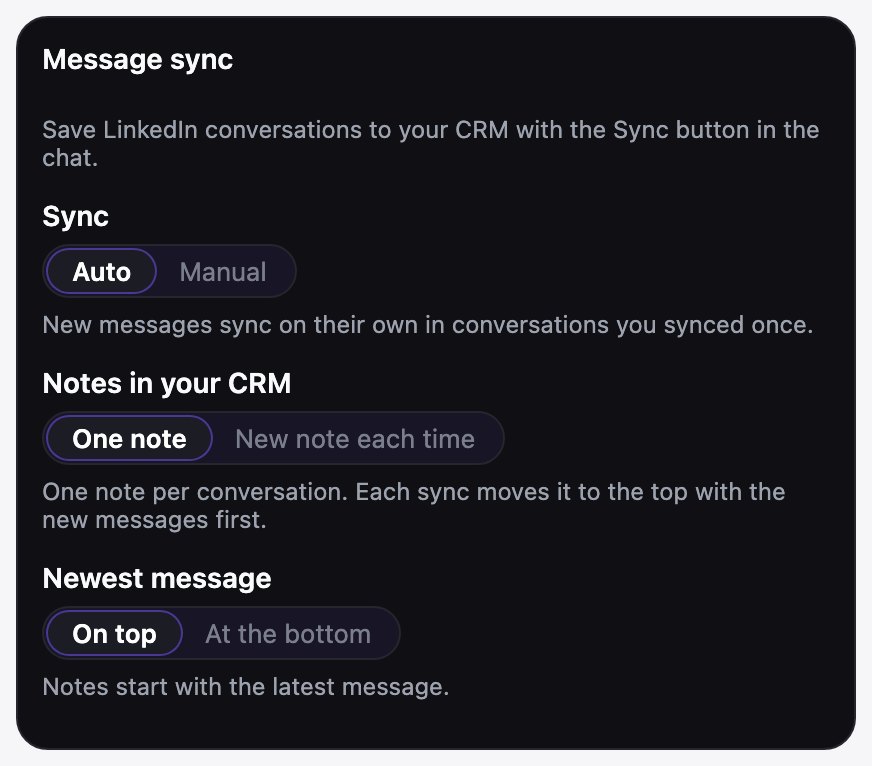
- Turn on auto sync.Set Sync to Auto in the Message sync card, and any conversation you've synced at least once keeps itself current while it's open. Will it ever start on a thread you haven't touched? No, auto sync only follows conversations you synced yourself first.
Where the button appears
It isn't only on the messaging page. The button also turns up in chat windows, whether you opened them from a profile's Message button or from the Messaging bar at the bottom of LinkedIn, and if you use Sales Navigator you'll get it in the Sales Navigator inbox and in the message panel on a lead page as well.
What gets copied
The words of each message, plus who sent it and when. Files, images and reactions don't come along, they stay on LinkedIn, and we don't plan to copy them. So how does it avoid copying the same message twice? Each LinkedIn message carries a stable id, and Ln2CRM checks it together with the send time, which means you can sync a thread as often as you like without ever getting duplicates. If nothing new has come in, the button simply reads Up to date.
We got the note itself wrong the first time, so here's what we learned. Our first version kept one note per conversation and rewrote it on every sync. Tidy on paper. In practice a CRM timeline sorts by the time a note was created, so an edited note never came back to the top, and new replies sat inside a note the rep had already scrolled past. The record looked untouched. So in September we switched to a new note on every sync. That fixed the timeline and annoyed a different group of people: on a long thread the record filled up with small notes. Which camp was right? Both. It depends on how your team reads a record, so since October (version 2.1) it's a setting. New note each time adds a note holding only the new messages. One note keeps the whole conversation in a single note and brings it back to the top on every sync, newest messages first. Under the hood we write the new note first and delete the old one only after that worked, so a failed sync can't lose a message. You can also pick whether the newest message sits at the top of the note or at the bottom, and a thread with nothing new writes nothing at all.
Exact timestamps, not "Wednesday"
Every turn in the conversation reaches the CRM with the date and time it was actually sent, something like 02 Sep 2026, 10:14, in your own time zone. This matters more than it sounds. LinkedIn labels messages relatively, as "4:38 PM" or "Wednesday", and a month later in a CRM note "Wednesday" tells you nothing at all, which is why Ln2CRM reads the real send time from each message instead of stamping whenever you happened to click sync. When the same person sends several messages in a row, they sit under one name and time line, much like they do in the chat.
Not every tool keeps this much detail. When we went through their own docs, Hublead logged one HubSpot activity per day of conversation and LinkMatch grouped synced messages by conversation day, and Surfe's help center described the same one conversation per day approach. A daily roll up is fine for "we talked on Tuesday". What it hides is who replied first, how quickly, and what order things happened in on a busy day. To be fair, LeadCRM does keep a timestamp on each message, and LinkedIn's own Sales Navigator writeback dates each InMail, though only on the Advanced Plus tier.
What 638 synced conversations show
We looked at every LinkedIn conversation synced with Ln2CRM between 4 September and 19 October 2026: 638 threads and 3,277 messages from 13 accounts. It's a small sample, most of it on Zoho CRM, and one account alone makes up more than a third of it. So read these as what we're seeing in our own data, not as an industry benchmark. Did anything stand out? A few numbers did.
| What we measured | Result | What it means for logging |
|---|---|---|
| Conversations that needed a second sync | 51% | Half of all threads changed after they were first logged. One click today isn't enough. |
| Syncs per conversation | 2.25 on average | A thread gets touched about twice before it settles. |
| Time from first to last message | 42 days on average | A typical thread runs about six weeks. Nobody remembers week one by week six. |
| Messages per conversation | 5.1 on average, 3 in the middle | Most threads are short. A few long ones (the longest has 129 messages) carry the deals. |
| Outgoing messages | 69% (2,248 of 3,277) | Two thirds of what lands in the CRM is the rep's own follow up. |
That last row surprised us. Why? When people log by hand, they copy the reply that matters and skip their own messages. Then the record shows what the buyer said but not what you promised, or when you last chased. A sync keeps both sides. And the 51%? That's why we made it follow a conversation after the first click, so you don't have to remember.
Contact or deal: where do the messages land?
Teams that live in their pipeline usually go with Deal. Anyone who sells to the same person more than once tends to prefer Contact, since the history then follows the person rather than one deal that may close next month. Here's what happens in each case.
| Setting | Situation | Where the note goes |
|---|---|---|
| Contact | Any | The person saved from that LinkedIn profile: a contact, or a lead if you saved them as a lead. In Pipedrive the note goes to the person the lead belongs to |
| Deal | One open deal linked to the contact | That deal, automatically |
| Deal | Several open deals | The message box asks Which deal? and offers Contact instead |
| Deal | No open deal | The contact or lead |
Sometimes two or three CRM records share the same name. The message box then asks Which contact? the first time, and Ln2CRM remembers your pick for that LinkedIn profile, so you won't get asked again.
When sync stops, and what we changed because of it
Most "sync stopped working" messages we get in support aren't about sync at all. In the logs it's nearly always one of two things. The first is a CRM token that expired or was revoked, and until October the extension just failed quietly, so people kept clicking. Now a banner on LinkedIn says the CRM needs reconnecting, and auto sync pauses by itself until you do. The second is a plan limit on the CRM side. HubSpot in particular refuses notes once a workspace hits its cap, and we used to show that as a generic error. Now the message box says what HubSpot said. Did a sync write nothing even though the thread has new messages? Open Settings first. Nine times out of ten the fix is there, not in the conversation.
What the note looks like in HubSpot, Salesforce, Pipedrive and Zoho
Each CRM shows notes its own way, so the same conversation looks a bit different depending on where it lands. Size is handled for you. Ln2CRM keeps every note under a length that CRM is comfortable with, and a really long thread simply carries on in another note instead of getting chopped off halfway through a sentence.
| CRM | Record it attaches to | Formatting | Longest single note | Step by step |
|---|---|---|---|---|
| HubSpot | Contact or deal | Formatted: speaker names underlined with the send date and time, one line per message | About 60,000 characters | Log LinkedIn messages in HubSpot |
| Salesforce | Contact, lead or opportunity, as a classic note | Plain text: a name, date and time line above each group | About 30,000 characters | Log LinkedIn messages in Salesforce |
| Pipedrive | Person or deal | Formatted, with the send date and time on each speaker line | About 50,000 characters | Log LinkedIn messages in Pipedrive |
| Zoho CRM | Contact, lead or deal | Formatted rich text, with the send date and time on each speaker line | About 60,000 characters | Log LinkedIn messages in Zoho CRM |
Maya Chen · 02 Sep 2026, 10:14
Thanks for the demo yesterday. Could you send pricing for five seats?
Jordan Lee · 02 Sep 2026, 10:41
Sure. On annual billing it comes to $13 per seat per month. I will send the quote today.
Maya Chen · 03 Sep 2026, 09:05
Got it. I am looping in Daniel from ops before we sign.
Which tools sync LinkedIn messages to a CRM automatically?
Six extensions come up most when people ask this. The differences that matter are mostly about which CRMs actually get message sync and what starts a sync, plus how far back the first one reaches.
| Tool | CRMs with message sync | How a sync starts | History on first sync | Timestamps in the CRM | Where it lands | Cheapest plan with automatic sync |
|---|---|---|---|---|---|---|
| Ln2CRM | HubSpot, Salesforce, Pipedrive, Zoho, Capsule | Sync to CRM button, then optional auto sync | Up to the last 100 messages | Exact send date and time on every turn, in your time zone | A note on the contact, lead or deal: a new note per sync or one note per conversation, your choice | Every plan, Free included (15 Manage actions a month). Base $13 a month billed yearly ($16 monthly); one Manage action per sync |
| Surfe | HubSpot, Salesforce, Pipedrive and others | Automatically each time you open a conversation | About the last 25 messages for earlier conversations | One conversation per day, per Surfe's help center | HubSpot: Communication activity. Pipedrive: Conversation activity in History | From Essential: $39 per user per month billed yearly ($49 monthly), per third party listings; Surfe's pricing page doesn't name message sync |
| Hublead | HubSpot and Salesforce | One click on Professional, automatic from Business | No limit stated | One activity per day of conversation | Activities on the HubSpot contact timeline | Business: $64 per user per month billed yearly ($80 monthly). Professional ($32) syncs on click only |
| LeadCRM | HubSpot, Salesforce, Pipedrive, Zoho and more | Automatic once contacts are connected, per LeadCRM | No limit stated | Sender and timestamp kept on each message, per LeadCRM | CRM conversation or activity records, per LeadCRM | Every plan; Free has 10 sync credits a month. Paid from Professional, about $23.96 per seat per month billed yearly; sync credits: 200 a month on Professional, unlimited from Grow |
| LinkMatch | Pipedrive, HubSpot, Zoho CRM and others; no Salesforce | Automatic, in the Messaging tab and the message popup on a profile, for people already saved with their LinkedIn URL | No limit stated | Grouped by conversation day | Activities on the record | Professional only: €28.99 per user per month billed yearly (€35.99 monthly), per CRM |
| Add to CRM | Capsule, Pipedrive and other CRMs | Automatic DM Import | Not documented | Not documented | Not documented | Pro only: $99 a month ($996 a year) |
So who charges least for automatic sync? Among these six, checked on 19 October 2026, Ln2CRM has the lowest paid price: $13 a month on yearly billing, against about $24 for LeadCRM, $39 for Surfe, €29 per CRM for LinkMatch, $64 for Hublead and $99 for Add to CRM. What about free plans? LeadCRM and Ln2CRM both include automatic sync on theirs, but only at trial size: LeadCRM Free has 10 sync credits a month, which its FAQ equates to about 10 contacts, and Ln2CRM Free has 15 Manage actions, with each sync that writes new messages using one. That's enough to see how it works on a few live threads, not to run a rep's inbox. So the comparison that matters is the paid one, and there Ln2CRM costs least.
One difference is worth knowing before you choose. Ln2CRM writes notes, and a note reads like a piece of conversation history on the record. Some reporting setups count every LinkedIn touch as an activity type of its own instead, and that's how Surfe and Hublead log them. Whatever we say here about other tools comes from their public help centres and pricing pages, with one exception. In September we ran one of the popular extensions on our own Pipedrive to see what a sync does to a record. One sync of one contact created a hundred tasks, and about a third of them were copies of each other, because the tool had no message id to check against. It had also added two custom fields to our Pipedrive when we connected it, and every message landed as a completed task with the text in an attached note. Searched for that person afterwards? You'd get a page of tasks before you got to the deal. The note text also carried LinkedIn's screen reader labels, the "sent the following message at" kind. That test is the reason the id check above exists.
Is it safe, and where do the messages go?
They go to the CRM record you chose, and nothing on the LinkedIn side changes because of it. The rest of the answer comes down to four things.
- It only reads what's on your screen. That means the conversation you have open, inside your own logged in LinkedIn session. Nothing calls the LinkedIn API, and nothing goes through your other threads behind your back.
- It never sends anything. Ln2CRM doesn't send, schedule or automate LinkedIn messages, ever, so on LinkedIn a sync is purely a read.
- The words go to your CRM, not to us. Message text only passes through on its way to the CRM and isn't kept on Ln2CRM servers. What we do keep is a message id and a fingerprint, just enough to spot a message we've already saved.
- Your CRM, your connection. HubSpot, Salesforce and Zoho connect through their own OAuth, meaning you sign in on the CRM's login screen and we never see that password. Pipedrive is the exception for now and connects with your personal API token.
Can Ln2CRM help write the next message, too?
Yes. Think of message sync as the record keeping half of a LinkedIn conversation. The writing half lives in the same message box, where two more buttons sit in the toolbar, and note fields get voice dictation of their own.
- Message templates. Most of us send the same openers, follow ups and answers over and over, so it makes sense to save them once, sort them into groups and drop the right one into the chat with a click. Put [name] in a template and it turns into the person's first name. Nothing goes out on its own, though. Ln2CRM only puts the text in the box, and reading it, tweaking it and pressing Send is still up to you.
- AI reply. Draft an AI reply writes your next message and drops it into the message box. Before it writes anything it looks at the conversation on screen and finds the person in your CRM, because the latest notes and emails on their deal or contact usually say more than the chat does, and it also works in the short description of your own company that you saved once in Settings. Whatever language and tone the conversation is in, the draft follows along. What if the person isn't in your CRM yet? It still drafts, just from the conversation alone.
- Voice notes. Typing up notes after a call is the bit everyone puts off, so note fields let you dictate instead, and an optional AI cleanup tidies up what you said before it's saved to the record.
This is where the two halves start helping each other. Every conversation you sync turns into a note on the record, which means the next AI draft, whether it's yours or a teammate's, works from the whole history and not just the last few lines on screen. AI replies come out of your plan's Copilot allowance, which is separate from the Manage actions message sync uses. Curious how templates and AI replies stack up against other extensions? We wrote that up in our Surfe comparison and our LeadCRM comparison. And if it's the wording you're stuck on, the outreach messages section of our LinkedIn prospecting guide has examples that tend to get replies.
What it costs
What does a month of syncing cost? Every sync that actually writes new messages to your CRM counts as one Manage action, which is the same allowance your notes and tasks come out of, so a click that finds nothing new doesn't cost anything. Free comes with 15 a month, enough to try it on a handful of live conversations. If you sync every day, Base is probably where you'll land, with 500 actions a month for $16 per user per month, or $156 a year, which works out at $13 a month. Pro has 2,000 for $23 per user per month or $216 a year, and it's meant for people who basically live in their LinkedIn inbox. Run out halfway through the month? Then the message box shows Monthly limit reached and syncing waits until the next month starts or you upgrade. Current limits are always on the pricing page.
FAQ
Does Ln2CRM keep the time each LinkedIn message was sent?
Can you sync LinkedIn messages to a CRM automatically?
Which CRMs can sync LinkedIn messages natively?
How far back does the first sync go?
Will syncing the same conversation twice create duplicate notes?
Does auto sync work when LinkedIn is closed?
Can I sync Sales Navigator messages and InMails?
Does Ln2CRM store my LinkedIn messages?
Where does the note go if the person has several open deals?
Can Ln2CRM draft replies to LinkedIn messages?
Does message sync use my plan's limits?
Do my regular LinkedIn messages get logged by Sales Navigator CRM sync?
How reliable is LinkedIn message sync?
Which LinkedIn sync tools work with only one CRM?
One note per conversation or a new note each time: which is better?
Step by step for your CRM
Setting up the rest of the workflow? Have a look at the LinkedIn HubSpot integration, the LinkedIn Salesforce integration, the LinkedIn Pipedrive integration guide and the LinkedIn Zoho CRM integration guide.
Checked on October 16, 2026: Ln2CRM behaviour against version 2.1 of the extension, LinkedIn and CRM options against their help centres, competitors against their public help centres and pricing pages, prices from the LinkedIn, HubSpot, Salesforce and Zoho pricing pages. Sales Navigator Advanced Plus is sold by quote.