
Ever searched "best free CRM for LinkedIn"? You get two piles of answers that don't fit together. Lists of free CRMs, none of which really talks to LinkedIn. And lists of LinkedIn tools, none of which you'd actually run a pipeline in. Why? Because the CRM and the LinkedIn bridge are two different jobs, and hardly anyone builds both. So we'll treat them as two things, then show the one free combination that covers both.
What is the best free CRM for LinkedIn?
Short answer: if you don't have a CRM yet, our pick for 2026 is crm2crm plus the Ln2CRM Chrome extension, and both cost $0. crm2crm is a free CRM with 5,000 contacts, 5,000 companies and 5,000 deals, unlimited seats and AI on your own key. Ln2CRM's free plan adds 15 Create, 15 Manage, 5 Copilot requests and 5 work email finds a month, and saves LinkedIn profiles straight into the CRM without duplicates. Out of the five options people compare most, not one free CRM tier connects to LinkedIn by itself. HubSpot and Zoho sync natively only through Sales Navigator Advanced Plus, sold by quote from about $1,600 a year per seat, and Zoho's free plan stops at 3 users. Pipedrive and Salesforce don't have a free plan at all. Already on HubSpot, Pipedrive, Zoho, Salesforce or Capsule? Keep it. The same free extension works with the first four, Ln2CRM for Capsule covers Capsule, and paid plans start at $16 per user a month.
Why "free CRM" and "free CRM for LinkedIn" are different questions
Good free CRMs aren't rare. HubSpot's free tier is famously generous, and Zoho and Attio will both hold a real pipeline for one person at no cost. If all you need is somewhere to keep contacts and deals, you're spoiled for choice.
Bring LinkedIn into it, though, and the list empties fast. None of those free tiers has a working two way LinkedIn connection. LinkedIn does sell an official integration, the Sales Navigator embedded experience, but it lives behind Advanced Plus, an enterprise add on charged per seat on top of your CRM and your LinkedIn subscription. For a small team already paying for a CRM, that's usually where the LinkedIn project quietly dies and everyone goes back to copy and paste.
So the real question isn't which free CRM is best in theory. It's which free setup gets someone you just found on LinkedIn into your CRM, linked to the right company, without a duplicate and without an enterprise LinkedIn bill. And that question has a clear answer.
crm2crm: the free CRM itself
crm2crm is a free CRM that feels familiar the moment you open it. Used Pipedrive before? Then you already know your way around: several pipelines with stages, a Kanban board you drag deals across, and a table view when you'd rather see rows than cards. Nothing to learn and nothing to set up before it's useful.
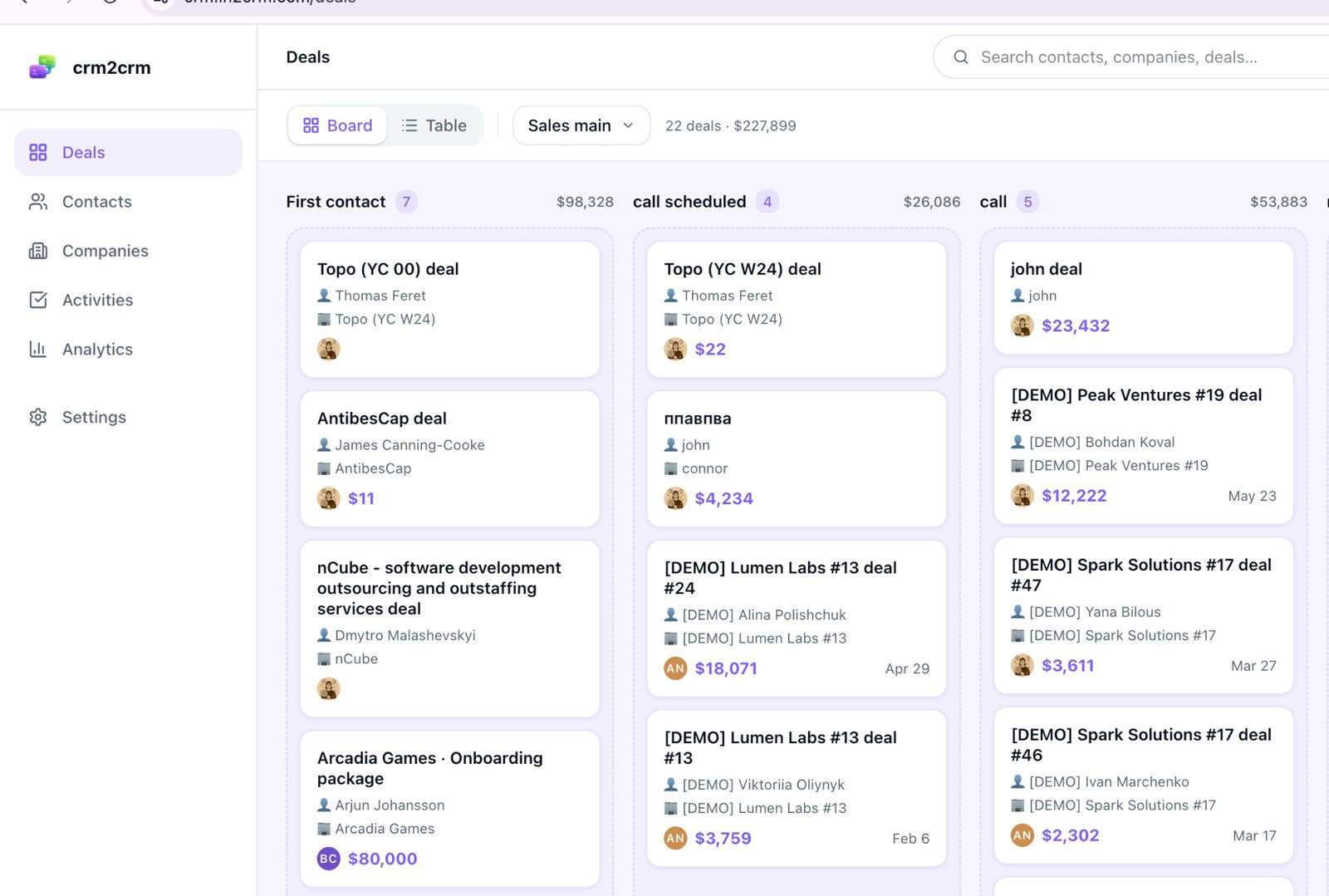
Under that familiar look it's a full CRM, not some cut down free sample:
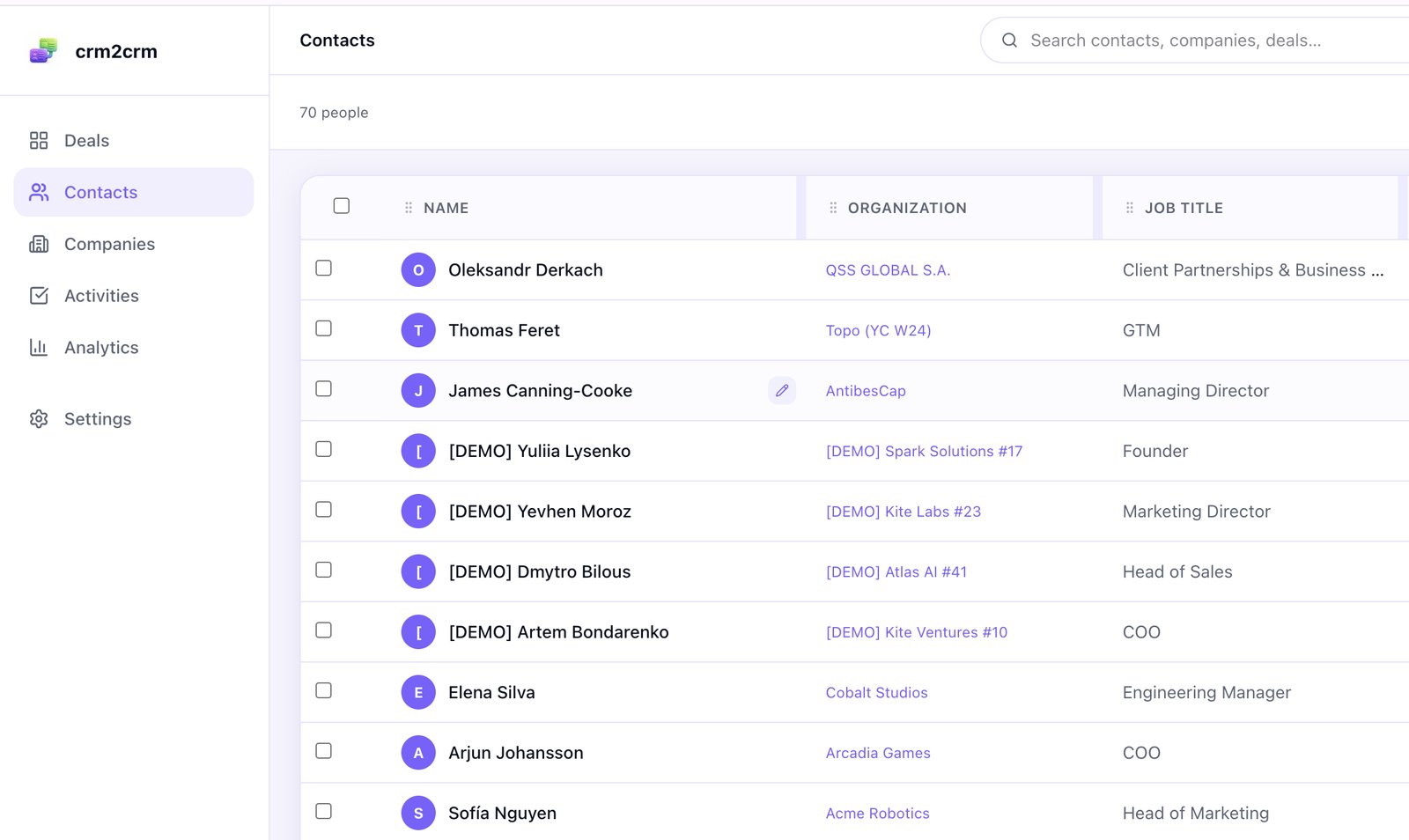
- Contacts, companies and deals with one activity timeline, several labelled emails and phones per person, and custom fields on anything.
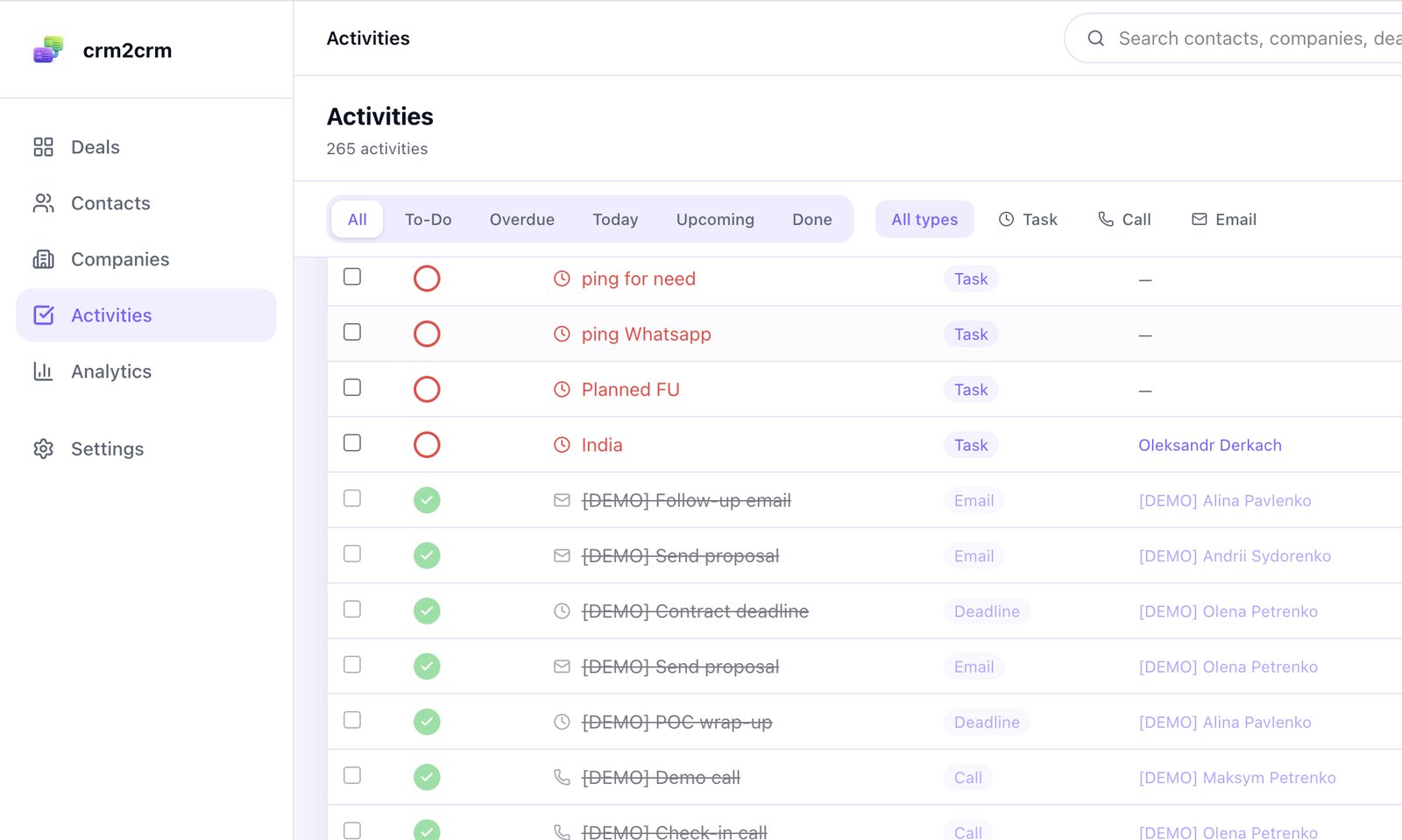
- Work that actually gets logged: tasks, calls and emails, notes you can pin and expand, labels, search across everything and quick add from anywhere.
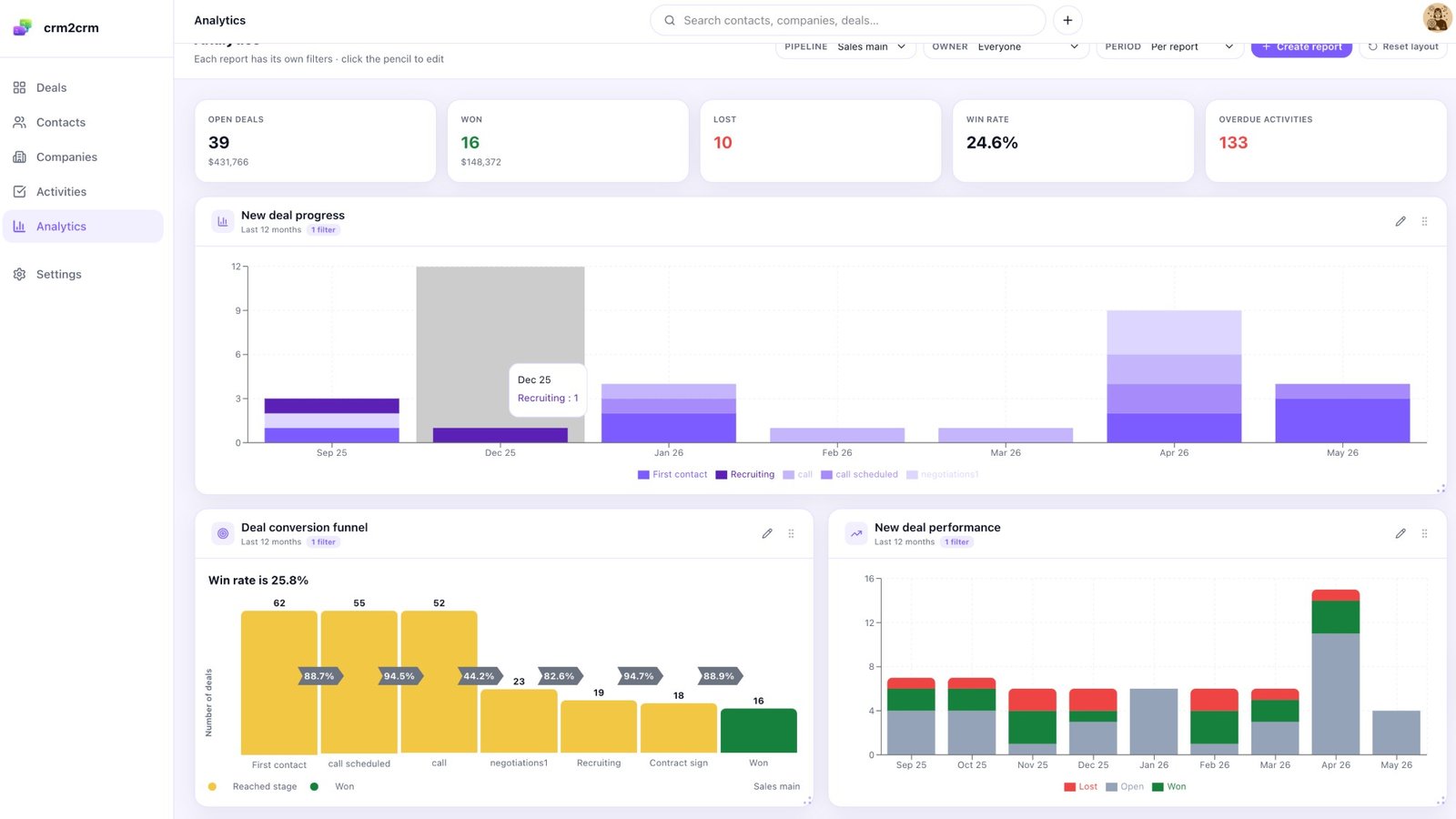
- Reports that answer real questions: pipeline summary, conversion funnels, how fast deals move, average deal size, deals going stale, win rate over time and where leads come from.
- Email that stays in sync: Outlook threads, smart BCC, attachments, plus CSV import and export.
- A Pipedrive migration you can pause and resume, with a field mapping wizard, so moving in takes a couple of clicks, not a project.
One honest gap: there's no native Google Workspace sync yet, because Google charges a lot for that access. Outlook users are covered today, and Gmail users rely on smart BCC and import for now.
The AI part, all on your own key
Here's the twist with the AI. It all runs on a key you bring, OpenAI, Anthropic or Groq, and if you'd rather have a plain old CRM, you can switch any of it off and hide it. Your data and prompts travel from your workspace straight to the provider you picked, crm2crm never sees them pass. That's how it stays free and keeps your pipeline private at the same time.
- AI Overview. One click sums up any record, where the deal stands and what to do next, with sources, and it's cached so a second look is instant.
- AI Research agent. Need background on a person or company? It goes and searches the web, then leaves a note on the record with links to where it found things.
- Capture. Got a long email, a call transcript or a messy chat? Paste it in and the AI picks out the to dos, and you tick the ones you want into tasks.
- Lead scoring you can actually trust. You set the weights and your ideal customer keywords, and the score is plain maths, so the same lead always gets the same number. What's the AI for, then? Only the two or three sentences explaining why. It also spots job seekers and junior titles, and caps anyone who works at a competitor.
- Smart Filter. Type "German SaaS deals over 10k closing this quarter" and it builds the actual filters for you.
- Deal warmth and Workspace Health. Is a deal warming up or going cold? You'll see the trend, not just the stage. And the Workspace Health check tells you how tidy your pipeline really is.
- Editable system prompts. The prompts behind Overview and Research are yours to change, per workspace.
Getting leads into it
Even without the LinkedIn extension, how do people get into crm2crm? Three ways:
- Inbox triage. It sorts your email by how urgent it is and nudges you about threads that went quiet, so the important reply doesn't get buried.
- Lead capture gives you a public web form and an email to lead address, and both create contacts from unknown senders automatically.
- Contact enrichment lets you plug in your own FullEnrich key and press Find email or phone on a contact when you need a way to reach them.
For the tinkerers
Like wiring tools together yourself? crm2crm goes further there than most free CRMs:
- A native MCP server. Point Claude, or any other MCP client, at your workspace and let the AI drive. It's got more than 90 tools, from searching and updating deals to moving stages, writing notes and scoring leads.
- Webhooks and API keys for your own automations. Each key only works in one workspace, and you can kill it whenever you like.
- White labelling. Your own name, logo, even the browser tab icon, plus accent colours and dark mode.
What is actually free, and what is the catch
Free CRMs usually hide the catch in the record limit. crm2crm doesn't. Every workspace gets:
- 5,000 contacts, 5,000 companies and 5,000 deals
- Unlimited team seats
- 10 pipelines
- 100 MB of file storage per user
- Every AI feature, on your own LLM key
So what runs out first? Storage, not records. 100 MB per person is loads for notes, contacts and the odd attachment, though it'll fill up if you treat the CRM like a shared drive. Records? A small team won't get near 5,000 for a long while. And there's nothing to upgrade to, because the running costs are your own AI and enrichment keys, paid straight to those providers.
How secure your data is
Free shouldn't mean careless. A CRM holds your customer list, often the most sensitive thing a small company owns, so we're being specific here rather than waving our hands.
- Encryption everywhere. Keys and credentials are encrypted at rest with AES 256 GCM, and everything travels over TLS. Passwords are hashed with Argon2id, the one OWASP recommends today, so they can't be recovered by anyone, crm2crm included.
- Strict separation between customers. No customer can ever reach another customer's data, and roles go owner, admin and member.
- Session security. JSON Web Tokens that the server revokes when you log out, plus rate limiting on login against brute force.
- API keys kept as hashes. You'll never find one in plain text, and each is tied to a workspace and can be revoked.
- Webhooks you can verify. Each one is signed with HMAC, and there's protection against SSRF tricks.
- Security by the OWASP book. Queries go through a parametrised ORM, so SQL injection's off the table. Input's checked against a schema. And since login uses Bearer tokens, not cookies, CSRF doesn't come into it.
- Your data stays in the EU. It's GDPR aligned, and with your own AI keys, records and prompts never go through crm2crm on their way to a model.
We'll say that last bit twice, since it's where most free AI tools get it wrong. With your own key, the sensitive part, your pipeline going to a language model, goes straight from you to the provider you picked. No middleman who might keep a log.
The part that makes it a LinkedIn CRM
All that makes a good free CRM. What turns it into a free CRM for LinkedIn? Ln2CRM, a Chrome extension that opens beside a LinkedIn profile or company page and writes into your CRM while you stay on the tab.
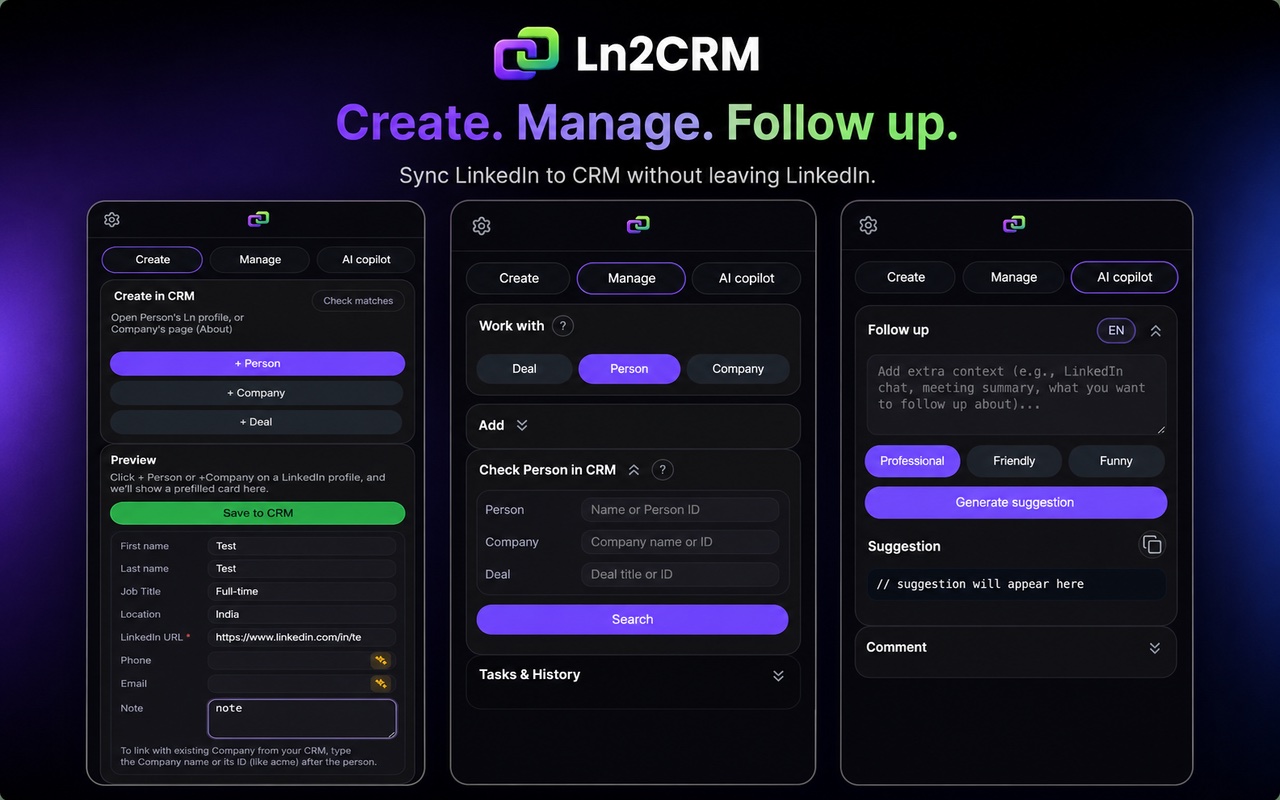
So what does it do on the profile you're looking at?
- Checks the person or company against your CRM and shows you right on the page whether they're already in there, so the duplicates stop.
- Saves a contact, company or deal from the profile in one go. The LinkedIn URL gets its own field, and that's what catches duplicates for people you don't have an email for yet.
- Shows you what the CRM knows right beside the profile, open deals, owner, last activity. Is a colleague already talking to them? You'll know before you type.
- Logs notes and tasks without a tab switch. Stuck on a reply? The magic pen drafts one with AI, from the record's history and the chat on screen.
- Takes notes by voice if you'd rather talk, with an optional AI tidy up before saving.
- Copies a LinkedIn conversation into the record, one neat note the first time, more notes as the chat carries on, on click or by itself. We explain the whole thing in syncing LinkedIn messages to your CRM.
- Works on regular LinkedIn, no Sales Navigator seat needed.
And the extension's pricing? Free gets you 15 creates a month, enough to see if it clicks. Base is $16 per user a month and bumps you to 500 Create and 500 Manage, which covers steady daily prospecting. crm2crm stays free underneath either way. The full table's on the pricing page.
Already use HubSpot, Pipedrive, Zoho, Salesforce or Capsule?
Then don't switch anything. crm2crm is for people who don't have a CRM yet. Running one of the big four already? You need the bridge, not a move.
Here's where the free plans people compare most actually stand, and how each one handles LinkedIn:
| CRM | Free plan, in short | Native LinkedIn on free | With Ln2CRM |
|---|---|---|---|
| crm2crm | 5,000 each of contacts, companies, deals; unlimited seats; full AI | No, none does | Yes, built for it |
| HubSpot | Strong free tier, real contact and deal records | Sales Navigator tier only | Yes |
| Pipedrive | No free plan, trial then paid | No | Yes |
| Zoho CRM | Free for up to 3 users, capable base | Sales Navigator tier only | Yes |
| Salesforce | No free plan, paid from the entry tier | Sales Navigator tier only | Yes |
Want paid options too? We compared eight in the best CRM for LinkedIn, put the capture tools side by side in LinkedIn sales tool pricing compared, and took an honest look at one enrichment focused rival in our LeadCRM comparison. Setup guides per CRM are here for Pipedrive, HubSpot, Zoho and Salesforce. And if you'd like to run that CRM straight from an AI chat, see the agentic CRM you drive from Claude and ChatGPT.
Try it yourself first
Rather see it than read about it? The demo opens a live crm2crm workspace full of sample data, no account, nothing to install. Click around the board, open a record, run an AI Overview, and see if it feels right.