
Search for an agentic CRM, an AI native CRM or an AI first CRM and you get a wall of the same sentence: every vendor now has AI. Open the products and the reality is thinner. In most of them AI means a chat box in the corner that can summarise a record or draft an email. That is useful, but it is not agentic. Agentic means an AI can operate the CRM, read your pipeline, move a deal, log a note, score a lead, on your instruction, the same way a junior rep would. Almost nobody ships that, because it needs the CRM to expose itself to a model in a safe, structured way. This piece is about the free CRM that does, in full detail.
Agentic, AI native, AI first: what actually separates them
These three labels get used as if they were interchangeable, and marketing has drained most of the meaning out of them. It is worth being precise, because the difference is exactly what you are shopping for.
- AI native means the CRM was built around AI from the start. The scoring, summaries and research are part of the core, not a paid add on stapled to a legacy product.
- AI first is the same claim from the buyer's side: AI is meant to do real work inside the tool, not sit in a side panel you forget about.
- Agentic is the higher bar. An external model can take actions in the CRM on your behalf, not just generate text you then copy somewhere. This is the part that needs a real interface for the AI, and the part most CRMs quietly do not have.
A tool can be AI native without being agentic. crm2crm is both, and the two claims rest on two different pieces of the product, so the rest of this article looks at each on its own, with the actual mechanics rather than the brochure.
What makes it agentic: a native MCP server with 85 tools
The agentic claim rests on one concrete thing. crm2crm ships a native Model Context Protocol server, built on the official MCP SDK, not a thin translation shim bolted over the REST API. MCP is the open standard that lets a model call tools in an outside system, and it is what Claude and, increasingly, ChatGPT and Grok use to reach beyond their own chat window. Because the server is first class and built in, there is no middleware, no integration platform and no glue code between your AI and your CRM.
The surface is deliberately large and specific: 85 tools and 5 ready-made prompts, all scoped to your workspace, all driving the same database tables the classic web app uses. There is no separate AI database and no second source of truth. In plain terms, you add your crm2crm workspace as a connector, then talk to your CRM in plain English. The model reads persons, deals, activities, inbox and pipelines, and writes notes, activities, deal moves and field values. Ask it to pull every deal stuck in negotiation for two weeks, add a follow up task to each and write a one line reason, and it does the work in the CRM rather than handing you a paragraph to action yourself.
The server is also built to be understood by a model that has never seen it. It carries an instructions blurb the client reads on connect, a help tool that returns a categorized, localized capability guide, and a stable pagination envelope so the agent can page through large result sets without guessing. When the agent is unsure, the design tells it to call search first, then act on the ids it finds.
The 85 tools, grouped by what they do
The catalog is not a token gesture. It covers the whole CRM, and it is organized into 21 categories so an agent can find the right verb quickly.
| Category | What the agent can do | Tools |
|---|---|---|
| Search & reads | Federated search plus list and get for people, deals, companies, pipelines, users and history | 10 |
| Persons | Create, update, delete contacts with a duplicate guard | 3 |
| Deals + movement | Create, update, move between stages, set won or lost, delete | 5 |
| Organizations | Create, update, delete companies | 3 |
| Pipelines & stages | Build and reorder pipelines and stages, with a delete preflight (admin) | 8 |
| Activities & inbox | Tasks, calls, meetings, email threads, and triaged inbound email | 7 |
| Captures | Ingest a card, email or transcript, review the extraction, accept into a record | 5 |
| Notes, custom fields, labels | Attach notes, read and write custom field values and definitions, tag records | 14 |
| Merges, trash, webhooks | Dedup with undo, restore from a 30 day trash, read and manage outbound webhooks | 12 |
| Team, settings, analytics | Roles and invites, workspace settings, plus 19 analytics reports, health and usage | 9 |
| AI: scoring, overview, research, enrichment | Score a lead, deal warmth, per record overview, web research, find email or phone | 8 |
| Help | Self documenting capability guide, localized to the workspace language | 1 |
| Total | Every verb the CRM needs, from a chat client | 85 |
On top of the tools sit 5 ready-made prompts that MCP clients show as slash style commands, so a user picks a task instead of typing it: crm_help, daily_briefing, pipeline_overview, top_deals and score_lead. Each one expands into a named tool chain, which is what makes the agent reliable rather than improvisational.
Connect it to Claude, ChatGPT, Grok, or your own agent
Agentic is only useful if it meets you in the tool you already talk to, so crm2crm is deliberately client neutral. The endpoint is one URL, with a trailing slash: https://crm.ln2crm.com/api/mcp/.
- Claude and ChatGPT. Add a custom connector with that URL. They auto-discover the OAuth 2.1 flow, self-register with Dynamic Client Registration, and open a sign-in window. You sign in to crm2crm and approve access on a consent page, and the connector then operates against your workspace. No client secret is stored anywhere, because every client is public and protected with PKCE.
- Grok. Grok wants a short manual form. The app's connector card hands you the exact values to paste: the endpoint, the client id
crm2crm-mcp, the authorize and token endpoints, auth methodnone (PKCE only), and the two scopes as separate chips. - Claude Desktop and Claude Code. No OAuth. Mint a long lived API key in Settings, then point the client at the endpoint through
mcp-remote. The key is shown once and can pin its own model provider. - Your own agents. Anything that speaks MCP, or plain HTTP with a scoped key, can drive the workspace. The CRM does not care whether the caller is a person, Claude, ChatGPT, Grok or a script you wrote at 2am.
The Claude Desktop config is as small as this:
{
  "mcpServers": {
    "crm2crm": {
      "command": "npx",
      "args": [
        "-y", "mcp-remote", "https://crm.ln2crm.com/api/mcp/",
        "--header", "Authorization:Bearer crm2crm_YOUR_KEY"
      ]
    }
  }
}
That client neutrality matters, because the AI chat you prefer this year may not be the one you prefer next year. An agentic CRM tied to a single assistant is a bet on that assistant. One that speaks the open protocol is not.
Safe by design: what the AI can and cannot do
Handing a model the keys to your customer list is only sane if the limits are enforced by code rather than by hoping the model behaves. crm2crm has three independent gates, all checked on every call.
- Read or write, your choice. A connection carries scopes. A read only connection can browse the entire CRM but every one of the 47 writing tools refuses with an insufficient scope error. You can safely give an assistant a look but not a pen.
- Admin actions need an admin. 23 workspace-configuration tools, things like editing pipelines, changing a teammate's role or deactivating a user, additionally require an owner or admin role, whoever the token belongs to.
- Destructive actions ask first. 11 tools that delete or merge refuse to act until the model passes an explicit confirm flag, and they return a human readable warning first. Even then, deletes are soft: records go to a trash with a 30 day recovery window, and merges are reversible through an undo tool.
Underneath, every token, whether an OAuth access token or an API key, is stored only as a revocable hash, is bound to your current workspace membership at the moment it is used, and is cut off instantly by a password reset or a log out everywhere. Deactivate a user or revoke a key and the very next agent call fails. That is what makes it defensible to let an AI act at all.
Ready-made agent playbooks
Because the tools are named and the prompts seed real tool chains, the useful work is one sentence away. A few examples, each of which the model runs as a sequence of calls rather than a guess:
- Morning briefing. "Give me my briefing." The model chains
list_activities overdue=true,list_inbox stalled=trueandlist_deals status=open, then tells you what needs attention, using the triage flags already stored on each inbound email. - Create a deal and a follow up. "Create a 25k EUR deal for Acme's CTO Jane Doe and remind me to call her Friday." It runs
search, creates the person if needed, creates the deal in your first pipeline, and schedules the call, in one turn. - Advance and close a deal. "Move deal 1423 to Negotiation and mark it won." It reads your stages with
list_pipelines_and_stages, callsmove_deal_to_stage, thenupdate_deal_status, logging the history events as it goes. - Score and prioritise. "Score Jane Doe and tell me if she is worth chasing." It searches, calls
score_person, and can runget_deal_warmthto rank your whole book by the linked contact's score. - Dedupe. "Merge the two Jane Doe records, keep the older one." It searches, compares, calls
merge_persons, which asks for confirmation, then folds the duplicate in, reversible for 30 days.
Notice what the CRM does not do: it never sends email from the chat. It schedules the work and logs the context, and leaves the sending to you. That is a deliberate line between an assistant that organises and an autopilot that acts in your name.
AI native from the inside: five subsystems on your own key
The MCP server is what an outside model uses. Inside the product, crm2crm is AI native in its own right, and its intelligence is five distinct subsystems, not one chat box. Every LLM feature runs on a key you provide, OpenAI, Anthropic or Groq, your data and prompts going from your workspace straight to the provider you chose, never routed through crm2crm. Crucially, the deterministic parts still work with no key connected.
- Lead scoring you can actually trust. The score is pure Python and deterministic: a 17 criteria rubric of ICP fit, timing, reachability and red flags, with editable weights and thresholds. The model never sees the weights and never picks the number, it only writes the two or three sentence reason. Red flag heuristics dock points for job seekers, freelancers and entry level titles, and a competitor rule hard caps the score for people at your competitors. Tiers are qualified, warm or cold. Turn the model off and you still get a number and a plain reason.
- AI Overview. One call summarises a person, company or deal: deal health and days since last touch, company context pulled from the website, and recent web news with real publication dates and clickable sources. It honours a system prompt you can edit per workspace, and it degrades to a deterministic one liner without a key.
- Web research agent. Runs a live web search on a person or company and writes a cited research note straight onto the record. This is agentic in miniature, a task the AI completes end to end.
- Contact enrichment. Find a verified work email or phone through your own enrichment provider key. This one uses no LLM at all, so it is honest about what it is: a data lookup, not a guess.
- Inbox triage. Inbound email is classified by intent and urgency, flagged when a thread has gone stalled, with a suggested action, so the reply that matters does not sink. The agent reads those flags through
list_inbox.
Analytics your agent can query
Numbers are where an agentic CRM earns its keep, because you can ask a question in words and get the report. crm2crm exposes 19 named reports through a single analytics tool: pipeline summary, deals by month, conversion and stage conversion, average deal size, velocity, won over time, rotting deals, activity breakdowns, source attribution and more. A workspace health scan grades adoption, data quality and security with recommendations, and a usage read out shows plan limits against current consumption.
Mixed currencies are handled honestly. A daily exchange rate feed converts every deal into your workspace base currency for the summary reports, so a pipeline of dollars, euros and pounds still gives one true total, and custom value units like FTE are supported where a raw amount would lie. When a quick ranked list uses the raw deal value instead, the built in prompts remind the model to say so rather than pretend the totals are converted.
Why your data stays private when it meets a model
The moment a CRM is AI native, the honest question is where your records go. Most free AI tools answer it badly, by routing your data through their own servers to a model they chose. crm2crm inverts that.
- Bring your own key. The sensitive path, your pipeline text going to a language model, runs from you to the provider you picked, never through a third party that could log it. This is also what keeps the product free, because the expensive part of AI never lands on their bill.
- Encryption everywhere. AES-256-GCM at rest for every key and credential, TLS in transit, passwords hashed with Argon2id.
- Strict multi tenant isolation with role based access across owner, admin and member, so one customer can never reach another's data, enforced on every single tool call.
- Tokens as revocable hashes. API and OAuth tokens are stored hashed and scoped, refresh tokens rotate, and a password reset or log out everywhere invalidates them instantly.
- Signed, protected webhooks with HMAC and SSRF guards, an OWASP aligned application, and EU data residency aligned with GDPR.
We wrote the full breakdown, limits and pricing included, in the best free CRM for LinkedIn. The point for an agentic tool is narrower: giving a model the power to act on your pipeline is only safe when the keys behind that power are scoped, revocable and never stored in the clear. Here they are.
It is a real CRM first, not a demo with AI on top
None of the AI matters if the underlying CRM is thin. crm2crm is built to feel familiar the second you open it. If you have used Pipedrive you already know the shape: multiple pipelines with stages, a drag and drop board, and a table view when you would rather see rows than cards.
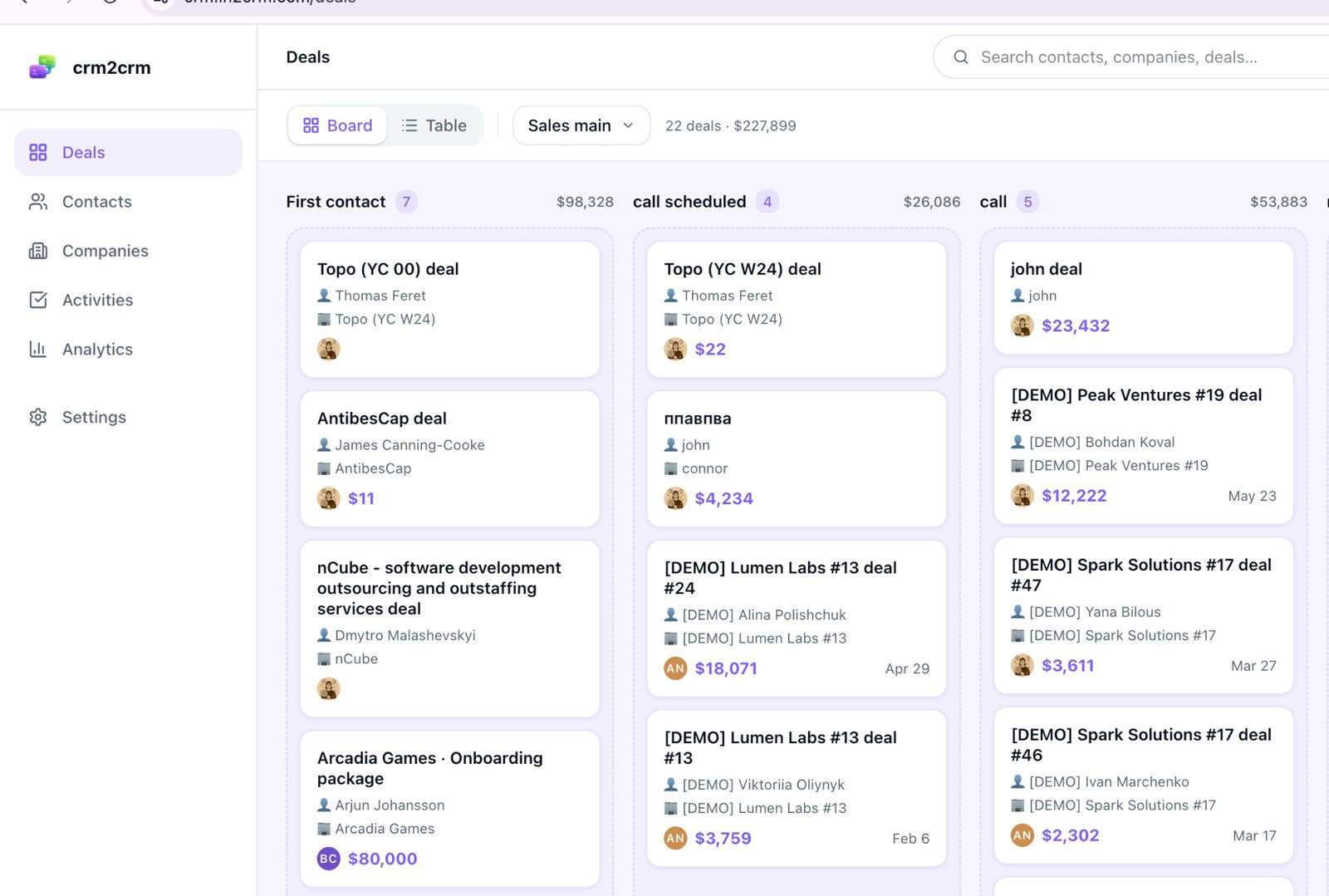
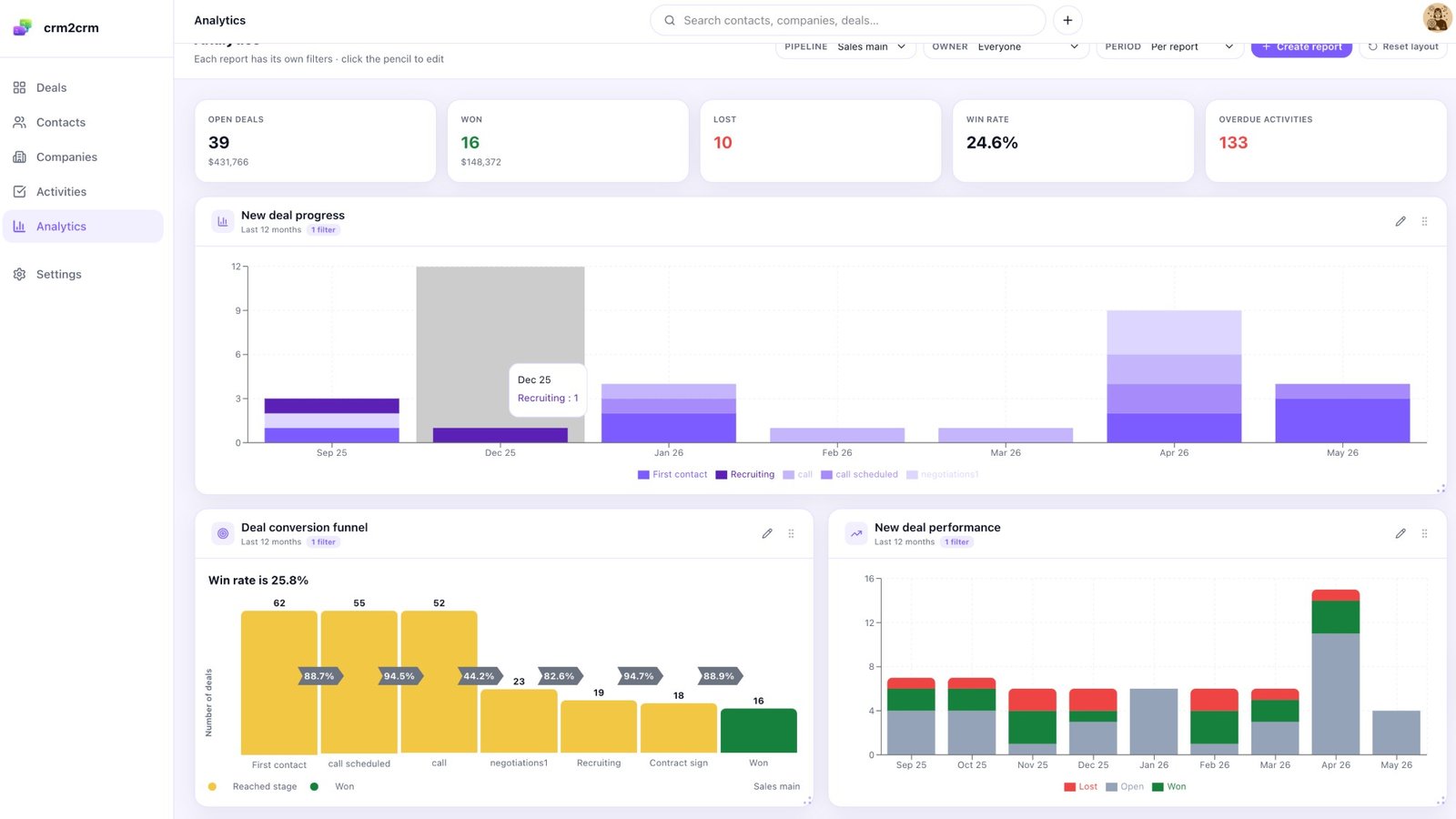
Underneath it is a full CRM: contacts, companies and deals on a unified activity timeline, tasks, calls, emails and notes, custom fields on any entity, Outlook thread sync and smart BCC, CSV import and export, and a resumable Pipedrive migration with a field mapping wizard. The one honest gap is native Google Workspace sync, which is not there yet because Google charges heavily for that access. The analytics are real too, and they are exactly the numbers you would ask an AI to explain.
Getting people into it, including from LinkedIn
An agent can only act on what is in the CRM, so the inbound paths matter. crm2crm has several before you add anything: inbox triage that ranks inbound email by urgency, a public lead capture form and an email to lead address, and contact enrichment on your own provider key.
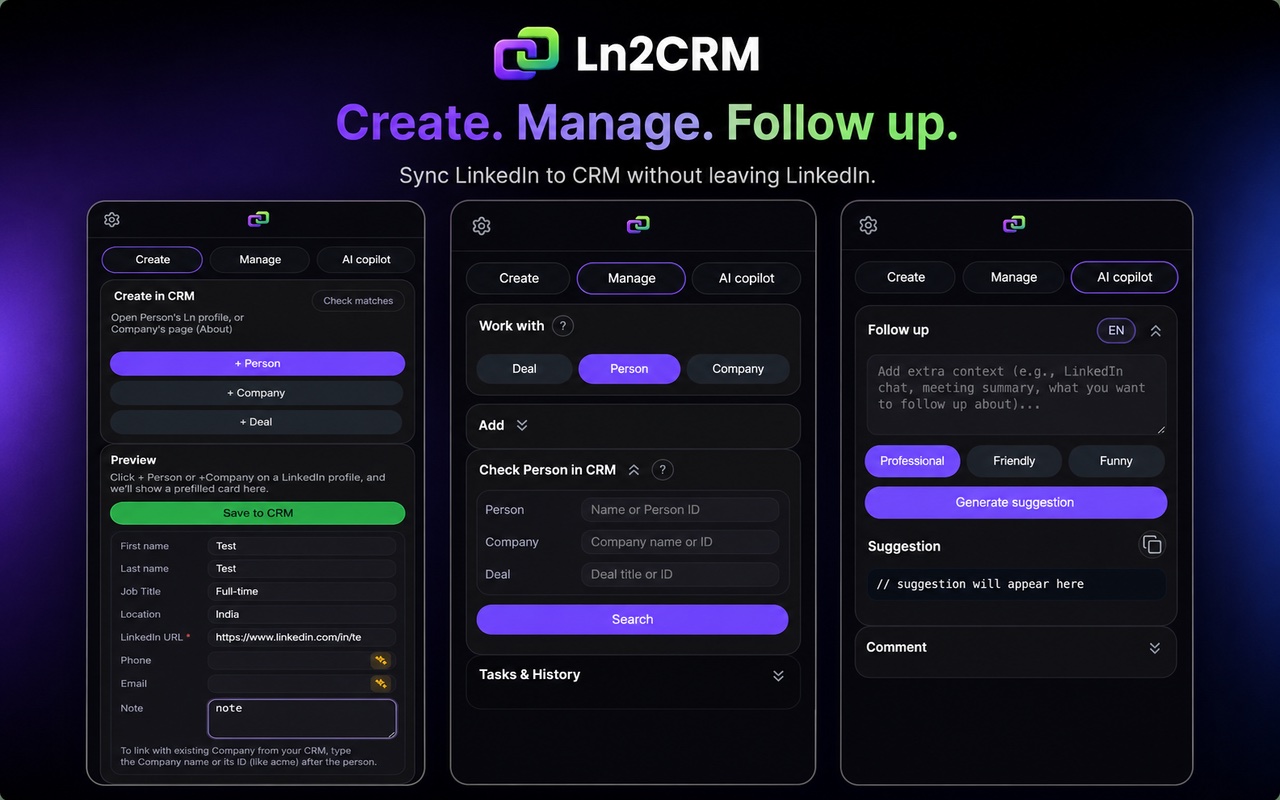
The one most B2B teams want is LinkedIn, and that is where the Ln2CRM extension comes in. It opens next to a LinkedIn profile or company page and writes into your CRM without leaving the tab: it checks whether the person already exists so you stop building duplicates, creates a contact, company or deal in one action with the LinkedIn URL stored for deduplication, shows existing CRM context next to the profile, and can sync a whole conversation into the record as one clean note. It runs on regular LinkedIn with no Sales Navigator seat, and the same extension connects LinkedIn to HubSpot, Pipedrive, Zoho and Salesforce if you already run one of those. The full method is in syncing LinkedIn messages to your CRM. Weighing CRMs rather than AI features? We line the options up in the best CRM for LinkedIn and the best free CRM for LinkedIn.
What it costs to run an agentic CRM
The honest answer is that the CRM is free and the AI is priced by whoever makes the model. crm2crm gives every workspace 5,000 contacts, 5,000 companies and 5,000 deals, unlimited team seats, 10 pipelines and 100 MB of file storage per user, with every AI feature and the full 85 tool MCP server included. There are no paid tiers to upgrade into.
What you pay is your own model usage, directly to OpenAI, Anthropic or Groq, and only for what your scoring, overviews, research and agent calls actually consume. That is the trade behind bring your own key: the CRM never marks up compute, and in return the running cost is transparent and yours to control. If you want the workflow to reach LinkedIn at volume, the Ln2CRM extension has a free tier for a few profiles a month and a Base plan at 16 dollars per user per month for steady prospecting, on the pricing page. The CRM underneath stays free either way.
Try it in your own AI chat
You do not have to take any of this on faith. The demo opens a live crm2crm workspace with sample data, no account and nothing to install, so you can click through the board, run an AI Overview, and then connect the workspace to Claude or ChatGPT and ask it to do something real.
https://crm.ln2crm.com/api/mcp/ to Claude or ChatGPT as an MCP connector. Want it fed from LinkedIn too? Add the Ln2CRM extension and point it at the same workspace, or at the CRM you already use.