
The Zoho CRM Chrome extension for LinkedIn prospecting
Open any LinkedIn profile and see whether the person is already in Zoho CRM, with their notes, tasks, and deal history. New prospect? One click creates the Lead or Contact, with the Account and fields filled in. No tab switching, no copy-paste, no Sales Navigator seat.
Why Zoho CRM teams need this on LinkedIn
Zoho CRM runs sales teams around the world on a budget, but its LinkedIn story is thin: no native profile capture, and little appetite among cost-conscious teams for a Sales Navigator upsell on top. So sales people retype prospects into Zoho by hand, one record at a time.
Ln2CRM gives Zoho the on-page layer it lacks. It detects your Zoho data center automatically, shows whether a profile is already a Lead or Contact, and creates or updates the record, with the Account linked, in one click, with no Sales Navigator seat and a free tier to start.
How the setup works
Install the extension
Add Ln2CRM from the Chrome Web Store. The extension opens as a sidebar on LinkedIn profile and company pages.
Connect Zoho CRM
Sign in through Zoho’s OAuth 2.0 flow and approve the scopes. Ln2CRM auto-detects your Zoho data center (.com, .eu, .in, .com.au, and others), so calls route to the right region. It never sees your password and access is revocable from Zoho.
Pick where the LinkedIn URL lives
Ln2CRM stores the profile URL in a Zoho CRM field you pick from a dropdown. Any existing field works, no new custom objects needed, and it becomes your dedupe key.
Choose Lead or Contact
Zoho has a Lead-versus-Contact split, so you decide how new people land: as Leads for a classic qualification flow, or straight as Contacts. One switch in Settings, changeable anytime.
Keep or hide the on-page badges
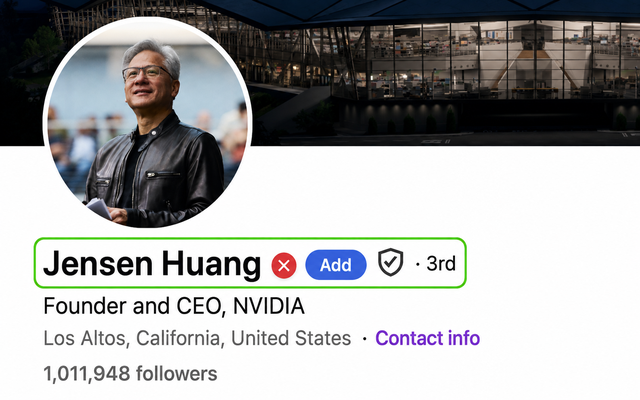
The green check and red cross on profiles are on by default. Leave them on for fast triage, or switch them off in Settings if you prefer a clean page.
Optional: plug in enrichment
Have a FullEnrich key? Add it in Settings and the sparkle icon fills missing emails and phones. You pay your provider directly, Ln2CRM adds no markup.
Prospect
Open any LinkedIn profile. The extension shows the Zoho CRM match with notes and tasks, or offers to create the record in one click.
Manage without leaving LinkedIn
From then on, search, link, update, and log your Zoho CRM records straight from the sidebar. Your CRM lives inside LinkedIn, no tab switching.
Add a person to Zoho CRM in one click
Open a LinkedIn profile and hit + Person. Ln2CRM reads the page and prefills the card, so you confirm the record instead of retyping it. Add a note, save, and it lands in Zoho as a Lead or Contact with the Account linked and the LinkedIn URL attached.
Name, job title, location, and the LinkedIn URL are pulled in automatically. Nothing to copy-paste.
New people land as whichever you chose in setup, and the Account is created or linked in the same click.
Type the account name or paste its Zoho CRM ID, and the person attaches to that existing Account instead of a duplicate.
Add them by hand, or click the sparkle to pull them in with your own enrichment key.
Manage the record without opening Zoho CRM
The Manage tab turns the LinkedIn page into a working Zoho view. Search any Lead, Contact, Account, or Deal, link the profile to the record, and see the tasks and notes your team already logged before you write a word.
Search by name or ID and link the profile to the matching Lead or Contact once, so it stays recognized.
Open tasks, past touches, and the full note timeline sit next to the profile, so you never double-message or forget a promise.
Add a note, schedule the next task, or change fields right from the panel. Twenty seconds, and the record stays current.
Spot who is already in Zoho CRM while you scroll
You do not even need to open the panel. Ln2CRM marks profiles and company pages as you scroll, so you can triage search results and see who is already a Zoho Lead or Contact in seconds.
The person is already in Zoho CRM. Click the badge to open their record and history.
Nobody on your team has captured them yet, so you see at a glance who is worth adding.
Made for global Zoho teams
Zoho’s users span regions and editions, so the extension is built to fit however your CRM is set up, starting with where your data lives.
Ln2CRM detects .com, .eu, .in, .com.au, .jp and the rest, and routes calls to your region so nothing crosses data centers.
Use Zoho’s qualification flow: new people can land as Leads and convert later, or go straight in as Contacts. One setting.
Link the person to an existing Account by name or ID, so you do not end up with three versions of the same company.
What lands where in Zoho CRM
Here is exactly how the LinkedIn data maps to Zoho CRM objects and fields. You confirm the mapping once during setup, and the LinkedIn URL becomes your dedupe key.
| From the LinkedIn page | Zoho CRM object | Field |
|---|---|---|
| Full name | Lead or Contact | First Name, Last Name |
| Current role | Lead or Contact | Title |
| Company | Lead or Account | Company / Account Name |
| Location | Lead or Contact | City, Country |
| Profile URL | Lead or Contact | Any field you pick from a dropdown, used for duplicate matching |
| Company page URL | Account | Any field you pick from a dropdown |
| Email and phone | Lead or Contact | Email, Phone (manual or via your own enrichment key) |
| Your notes | Lead, Contact, or Deal | Note attached to the record |
| Follow-up | Task | Subject, Due Date, linked to the record |
Supported objects: Lead, Contact, Account, Deal, and Task. Works with Zoho CRM editions that include API access, across every Zoho data center.
How the Zoho connection works
Ln2CRM connects to your Zoho CRM over standard OAuth 2.0, acts only as the connecting user, and never stores your Zoho data. Here is what that means for security.
Users connect through Zoho’s own login and consent screen and approve the scopes once. Ln2CRM keeps a scoped, revocable token, never a password. Revoke it anytime from Zoho and the connection stops immediately.
Zoho runs regional data centers. Ln2CRM detects yours (.com, .eu, .in, .com.au, .jp, and others) and routes every API call to the right region, so nothing crosses to the wrong data center.
Reads and writes Leads, Contacts, Accounts, Deals, and Tasks, only as the connecting user and within that user’s Zoho permissions. It cannot see or change anything the user cannot.
Records are created and updated directly in your Zoho CRM. Ln2CRM does not sell a contact database and does not copy your CRM into a separate store.
Zoho ties the access token to the exact scopes approved at connection time. If a future Ln2CRM feature needs a new scope, you will be asked to reconnect once so Zoho can grant it. No admin rights are required to connect for yourself.
Security questions or a review request? Email admin@ln2crm.com.
What your team does with it
Pricing that stays out of the way
One subscription covers Salesforce, Pipedrive, HubSpot, and Zoho. Full details on the pricing page.
Test the full workflow with monthly credits. No card required, no trial timer.
For daily prospecting: create, match, and update records with higher monthly limits.
Adds the AI copilot grounded in your CRM history, plus a free crm2crm seat.
FAQ
How do I add a LinkedIn profile to Zoho CRM?
Do I need Sales Navigator for this to work?
Which Zoho objects and data centers are supported?
How do I connect it to Zoho?
Is the Zoho connection safe?
How does duplicate prevention work?
Is there really a free tier?
Put Zoho CRM inside LinkedIn
Install in a minute, connect Zoho CRM, and save your first prospect before the coffee cools.