
Landed here? You're probably looking at a renewal email. Maybe the price went up, maybe someone quoted you for a bigger plan and you winced, or maybe it just dawned on you that $390 a month for ten seats is a lot for a pipeline and a contact list.
The natural reaction is to hunt for a "cheaper Pipedrive", same shape, nothing new to learn for the team. Fair enough. Here's the honest answer, and it'll take you about ten minutes.
Which Pipedrive alternative should you pick?
Short answer: it depends what you used Pipedrive for. Will marketing matter soon? HubSpot's free CRM is the safe start. Most features for the money? Zoho Bigin. On the phone all day? Close. Want a flexible database instead of a board? Attio or folk. And if you want Pipedrive's exact shape, the kanban, the contacts table, the activity queue and custom fields, without a bill, crm2crm is the only one here with no paid tier at all: 5,000 contacts, 5,000 companies, 5,000 deals, unlimited seats, 10 pipelines and every AI feature on your own LLM key. A ten minute migration through the API keeps your custom fields, notes and past activities. Depend on LeadBooster, Smart Docs or Campaigns? Stay on Pipedrive, and read "When not to switch" below.
Why Pipedrive feels expensive in 2026
Pipedrive's list prices are easy to find, and they're higher than most people remember. Here are the 2026 tiers on annual billing:
- Lite: $14 / user / month
- Growth: $39 / user / month
- Premium: $59 / user / month
- Ultimate: $79 / user / month
And that's only half of it. Pipedrive renamed its plans in 2025, so these are the current Lite, Growth, Premium and Ultimate. The stuff sales teams actually buy Pipedrive for, workflow automation, email open tracking, two way email sync, the scheduler, dashboards, starts at Growth. AI now comes in every tier, which sounds generous until you notice you pay for it in the seat price whether anyone uses it or not. Then come the add ons: LeadBooster from $32.50 per company, Web Visitors from $41, Smart Docs from $32.50, Projects from $16, Campaigns from $13.33. A team of five that started on Lite at $70 a month often ends up at $250 to $300 once the add ons pile up.
Searching for something cheaper doesn't make you a cheapskate. It's a feeling, isn't it? I'm paying enterprise prices to manage a hundred and fifty deals. And you know what, the feeling's right. The maths agrees.
What "affordable" actually means here
So what do we mean by "affordable" here? Not a stripped down free tier that hits a wall at 100 records. We mean:
- A real free tier that fits a small pipeline, not a two week trial.
- A paid tier under $10 a seat that doesn't lock away the kanban, custom fields or reports.
- No pile of surprise add ons. The price you see is what you pay.
7 Pipedrive alternatives in 2026, compared
Why is "Pipedrive alternative" such a crowded search? Because lots of teams are in your shoes. Here's an honest map of where people usually look, what each option costs to start, and the catch nobody puts on the pricing page. Prices are the vendors' published annual rates, checked in October 2026.
| # | Tool | Best for | Entry price | The catch |
|---|---|---|---|---|
| 1 | HubSpot CRM | A free starting point with room to grow into marketing | Free, then Sales Hub | Sales Hub Professional climbs past $90 per seat once you need automation and reporting |
| 2 | Zoho Bigin and Zoho CRM | Most features per dollar for small teams | Bigin from about $9 per seat | Full Zoho CRM gets busy fast and the interface is a step away from Pipedrive's simplicity |
| 3 | Freshsales | Built in phone and light automation | Free tier, paid from about $9 per seat | The free tier is thin and the useful pieces sit on higher plans |
| 4 | Close | High volume outbound calling teams | From about $25 per seat | Priced above Pipedrive and overkill if you are not a calling shop |
| 5 | Attio | A flexible, relationship led data model | Free plan for small teams, paid from about $29 per seat | A database with views, not a pipeline board, so the team relearns the workflow |
| 6 | folk | Lightweight relationship tracking for founders and agencies | From about $20 per seat | Pipeline is lighter than Pipedrive's and reporting is basic |
| 7 | crm2crm | Teams that want Pipedrive's exact shape at no cost | Free for everyone, no paid tier | No marketing automation, document builder or two way email sync yet (see "When not to switch") |
1. HubSpot CRM
It's what most teams find first when they google "Pipedrive alternative", and if marketing will matter within a year, it's a fair pick. The free CRM is generous with contacts and the board is clean. Where's the catch? Where the price goes next. Sales Hub Professional, where automation and proper reports live, costs more than $90 a seat, which beats even Pipedrive Premium. Need LinkedIn too? The Ln2CRM extension works on HubSpot Free, so the free tier stays useful for prospecting.
2. Zoho Bigin and Zoho CRM
In the Zoho family, Bigin is the closest thing to Pipedrive's simplicity: a CRM built around a kanban, from about $9 a seat, with email and a mobile app. Full Zoho CRM gives you the most features per dollar on this list, but it's dense, and most Pipedrive people feel the extra complexity on day one. Ln2CRM saves LinkedIn profiles into Zoho CRM in every data center.
3. Freshsales
Freshworks' CRM comes with a built in phone, a free tier and light automation, and paid plans from about $9 a seat. The free tier is thin on reports, though, and what makes it a real Pipedrive rival sits on the Pro plan. Moving there? Budget for Pro.
4. Close
Close is made for outbound teams who live on the phone. Calling, SMS and sequences come built in, not as add ons. It starts around $25 a seat and climbs fast. Not a calling team? Then you're paying for a dialer you won't touch, and it ends up costing more than Pipedrive, not less.
5. Attio
Attio is the modern, relationship focused pick. Contacts, companies and deals are objects you shape yourself. There's a free plan for very small teams and paid plans from about $29 a seat. The trade off? It's a database with views, not a pipeline board, so a Pipedrive team has to relearn the daily routine rather than recognise it.
6. folk
folk is light relationship tracking for founders, agencies and small partnerships, from about $20 a seat. You'll have it set up in minutes and it's nice to use, but its pipeline and reports are lighter than Pipedrive's, so teams with a proper stage by stage process tend to outgrow it.
7. crm2crm
crm2crm fills the dull gap nobody else bothers with. Same board, table, activity queue and custom fields as Pipedrive, at a price that doesn't climb when you add seats or automation, because there isn't a price. Every workspace gets 5,000 contacts, 5,000 companies, 5,000 deals, unlimited seats and 10 pipelines, and AI runs on your own LLM key. It's also the only CRM here you can drive from Claude, ChatGPT or Grok through a native MCP server, which the agentic CRM guide explains. What's still missing is listed honestly in "When not to switch" below.
Notice the pattern? Most alternatives are either free until you outgrow them, or a different way of thinking you have to learn. The rest of this guide shows the one free option that keeps Pipedrive's shape, what a migration keeps, and when you shouldn't switch at all.
The crm2crm answer in one screen
Easiest way to explain what we built? Show it. Here's the Deals board in crm2crm:
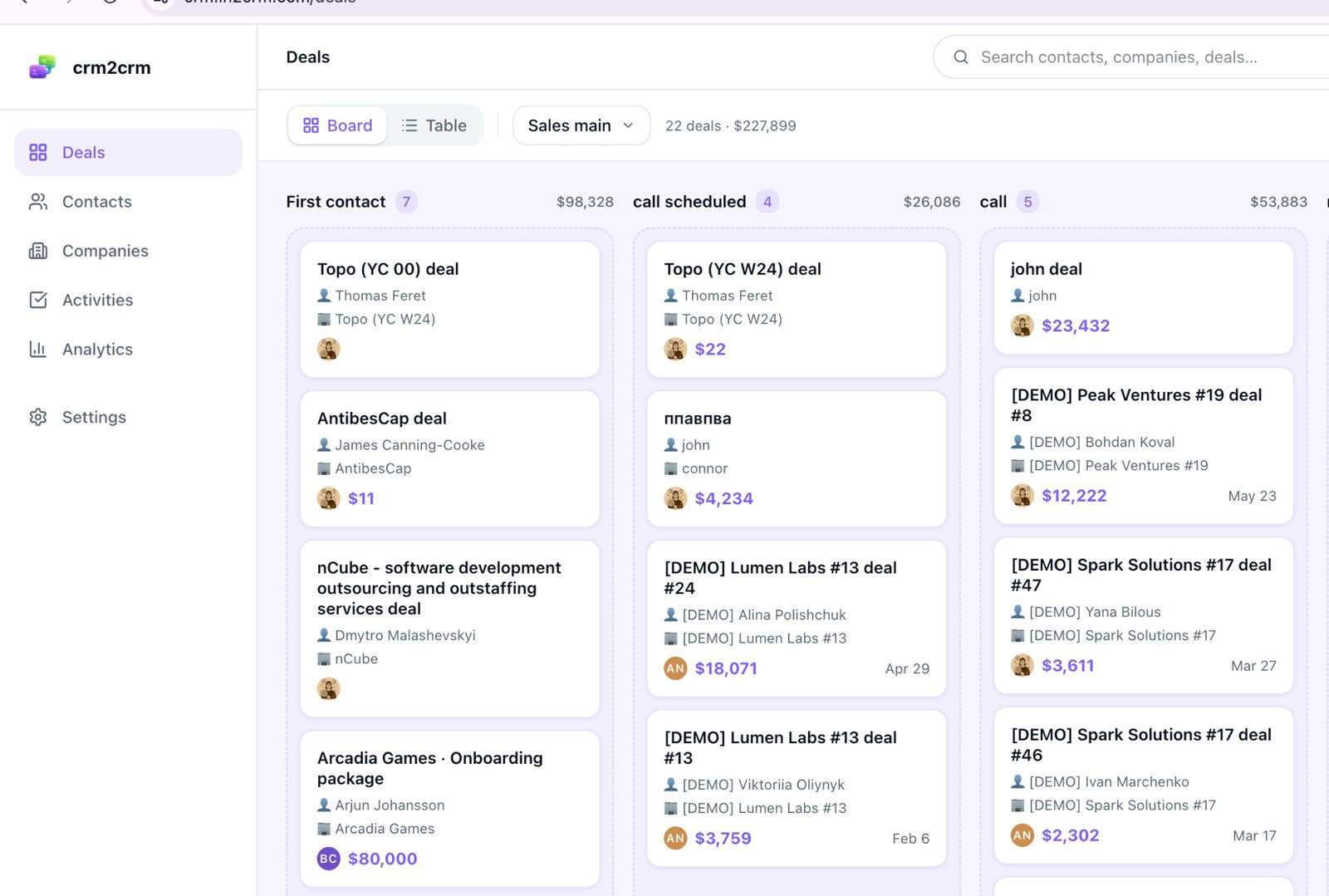
Look familiar? It's the same shape as Pipedrive's pipeline page. Flip between Board and Table at the top, switch pipelines in the dropdown, drag cards between stages. Each card shows the person, the organisation, the value and the owner. The header adds up the view, 22 deals · $227,899, putting the money first, just like Pipedrive.
Is your team's big worry "we'll have to relearn everything"? This is the answer. Same way of thinking, same habits, only the button colours change.
Contacts
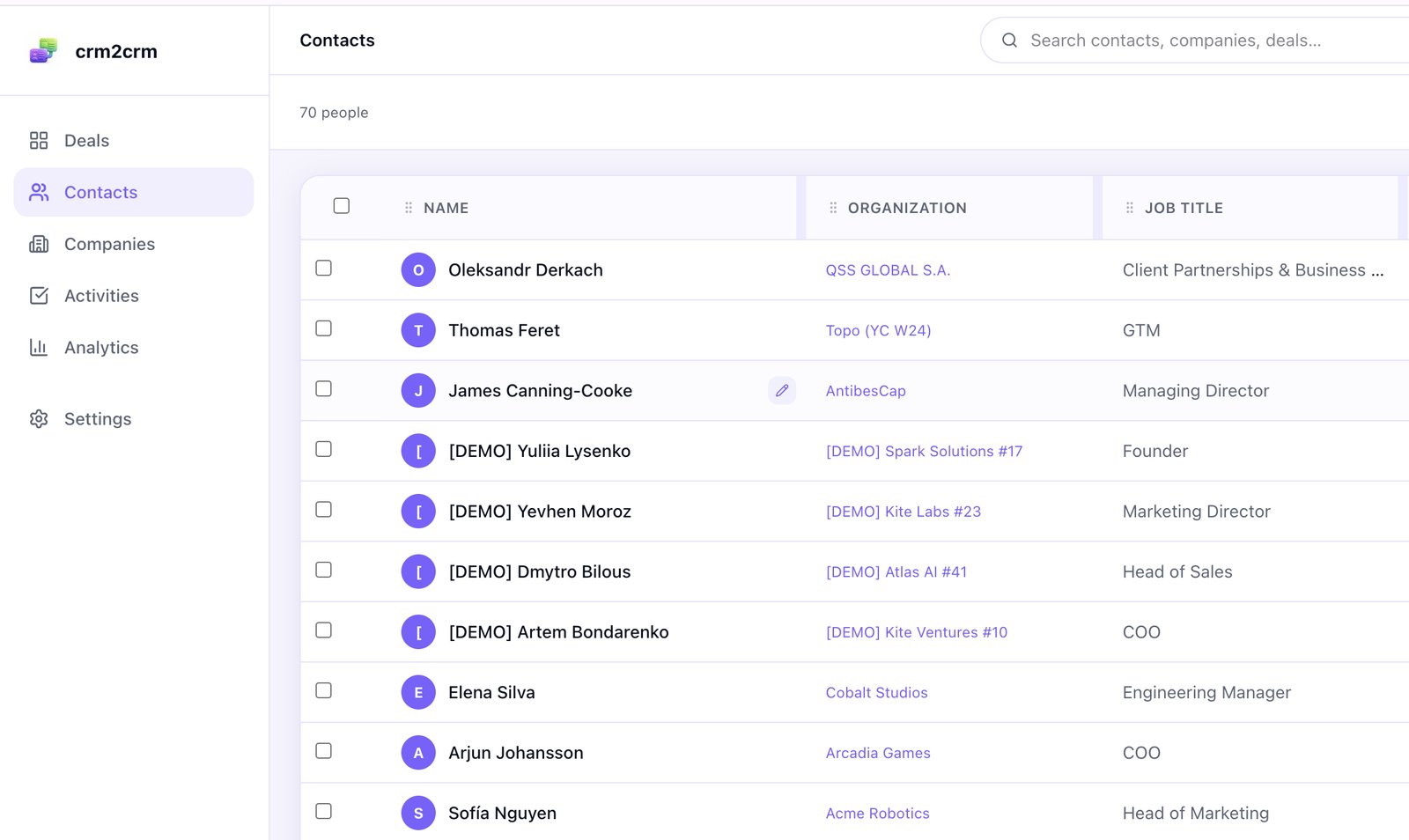
Contacts is a table. Add your own columns (job title, location, a decision maker flag, whatever you tracked in Pipedrive), drag them into order, sort, filter, and select a bunch for export. Hover and you'll see the little pencil for inline edits, same as in Pipedrive's table view.
Activities
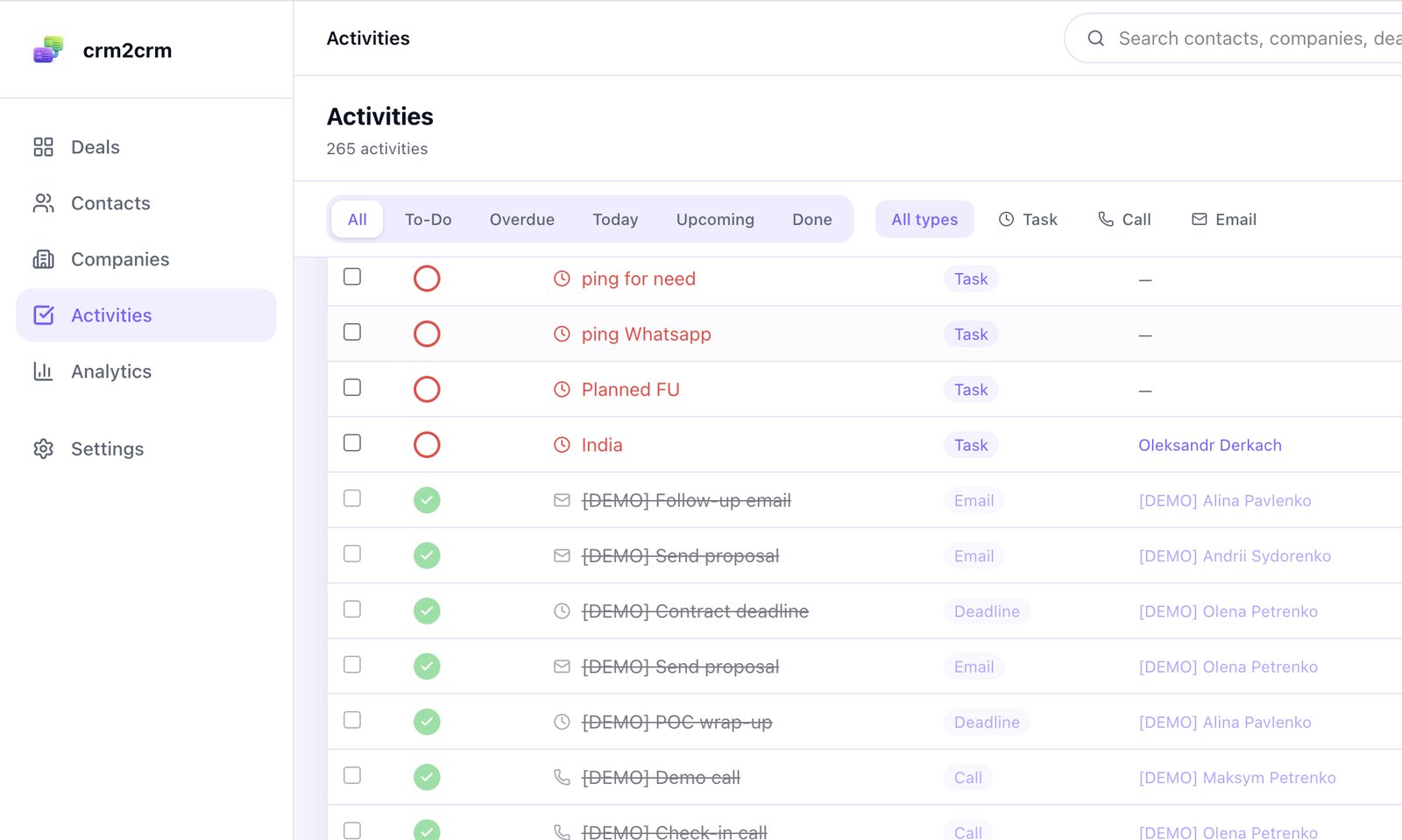
Activities is the queue Pipedrive people open first thing every morning. Overdue at the top, today's calls and emails next, scheduled tasks under that. The checkbox sits on the left, and done items get crossed out, still visible but quiet, just like you're used to.
Analytics
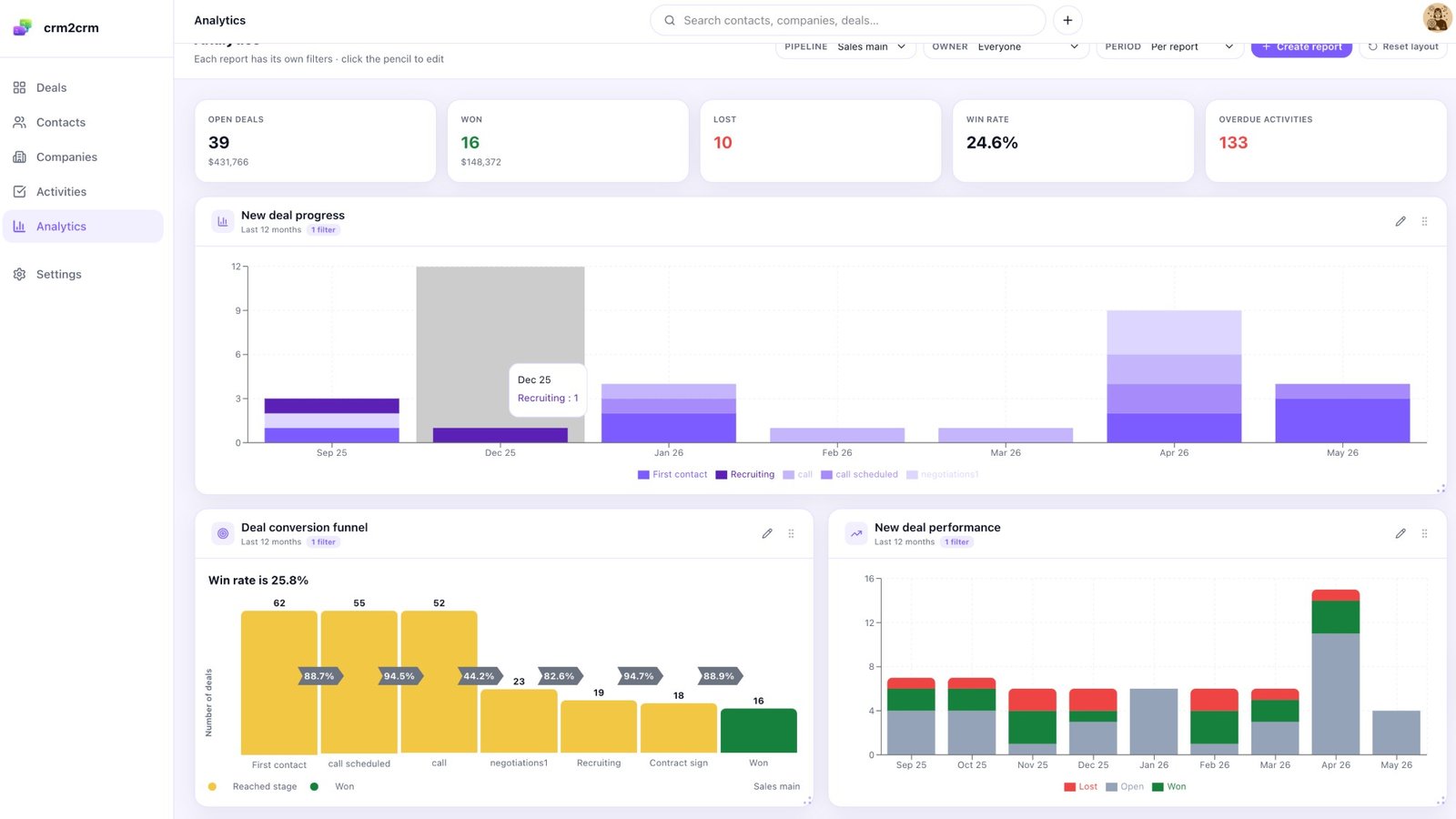
Reports are what most "lite" CRMs cut. We didn't. Five cards across the top, Open deals, Won, Lost, Win rate and Overdue activities, the first things any sales manager checks. Below them, a funnel shows where deals drop between stages, with conversion rates, and the chart on the right breaks down new deals by month. The filters up top (pipeline, owner, period) work just like Pipedrive's Insights page.
Show your sales manager this page and say "here's the new dashboard". You'll get a shrug, not a complaint, and that's the whole point.
Feature parity, side by side
Here's the honest comparison. Where we have something Pipedrive doesn't, we say so. Where Pipedrive has something we don't, we say that too.
| Capability | Pipedrive (Growth) | crm2crm |
|---|---|---|
| Pipeline kanban with drag to move | Yes | Yes |
| Table view of deals | Yes | Yes |
| Multiple pipelines | Yes | Yes (up to 20 on Pro) |
| Custom fields (person, org, deal) | Yes | Yes |
| Multi email / multi phone per contact | Yes | Yes |
| Activities: tasks, calls, emails, deadlines | Yes | Yes |
| Notes on people, orgs, and deals | Yes | Yes |
| Activity queue with filters | Yes | Yes |
| Conversion funnel + win rate dashboard | Dashboards (Premium+) | Included on every plan |
| Bulk CSV export | Yes | Yes |
| Bulk CSV import | Yes | Yes (with duplicate handling) |
| API + webhooks | Yes | Yes |
| LinkedIn extension (create / match / log from LinkedIn) | No native | Yes, via Ln2CRM |
| Email tracking, open/reply alerts | Yes (Growth+) | Roadmap |
| Two way calendar & email sync | Yes (Growth+) | Roadmap |
| Workflow automation | Yes (Premium+) | Limited (webhooks) |
| AI Overview (LLM summary per contact, deal, org, 24h cached) | Built in AI assistant (bundled) | Yes, bring your own LLM key |
| AI Research Agent (auto enrich person or organization with sources) | No | Yes, bring your own LLM key |
| Lead scoring with AI narration | Rule based only | Yes, rubric + AI explanation |
| LeadBooster, Smart Docs, Campaigns | Add ons ($13 to $33 each) | No |
| Marketing automation | Campaigns add on | No |
The pattern's simple: everything a sales team uses daily, we have. The genuinely handy AI lives in crm2crm too, an LLM Overview for any record, a Research Agent that digs on its own, and lead scoring with an AI explanation, all on your own LLM key, so each query costs what your provider charges, not a fixed add on. The stuff that gets demoed in webinars and rarely opened, marketing campaigns, heavy workflow automation, we skip. Not carrying that weight is part of why it can be free.
The pricing math
Let's do the maths for a real team of five.
| Tier you would actually pick | Pipedrive | crm2crm |
|---|---|---|
| Per seat price | $39 (Growth) | $0 (free) |
| 5 seats / month | $195 | $0 |
| 5 seats / year | $2,340 | $0 |
| + LeadBooster (1 company) | +$390 / year | not needed |
| + Web Visitors | +$492 / year | not needed |
| Realistic annual total | $2,340 to $3,222 | $0 |
This isn't a percentage difference, it's the whole bill. Even on bare Pipedrive Growth with no add ons, five people pay $2,340 a year. On crm2crm that same team pays nothing. What's left to pay? Only your own AI provider, and only if you turn the AI on, since you bring your own key and pay them directly.
Do you need to buy anything to unlock it? No. crm2crm is free for everyone, not just Ln2CRM customers, no card, no subscription. If you prospect on LinkedIn with Ln2CRM (the Chrome extension that creates and matches records from LinkedIn pages), the two make a tidy pair: create the contact from LinkedIn, run the deal in crm2crm. But that's a convenience, not a gate. The CRM is free either way.
What the free workspace includes
Is it a trial? No, and there's no paid tier lurking to bill you later. Every workspace runs forever, without a card, and includes:
- 5,000 contacts
- 5,000 companies
- 5,000 deals
- Unlimited team seats
- 10 pipelines
- 100 MB file storage per user
- All AI features (LLM Overview, Research Agent, lead scoring), on your own LLM key
That's enough for a solo founder, a whole sales team or a busy setup with several pipelines. You won't hit a "free vs paid" wall either: custom fields, multiple owners, the kanban, reports and the activity queue are all in the one free plan. The only thing you might ever pay for is your own AI usage, billed by your provider, not us.
What a Pipedrive to crm2crm migration actually looks like
We wrote a longer piece on migrating from Pipedrive without losing custom fields, notes or activities. Here's the short version:
- Paste your Pipedrive API token into the crm2crm migration wizard. Where's the token? In Pipedrive under Settings → Personal preferences → API.
- Check and map the fields. The wizard reads every custom field from Pipedrive and matches the standard ones for you (name, email, phone, value, currency, stage). Your custom fields show up in a mapper with both sides next to each other, and you keep, rename or drop each one.
- Run the import. It runs in the background. Pipelines and stages come first, then people, organisations, deals, notes and activities, in that order, with all the links between them intact. Run it again later on the same workspace? It updates instead of duplicating, since every Pipedrive ID is remembered.
We tested it on a Pipedrive workspace with 100 deals. Schemas, 70 contacts, 22 deals, 193 notes and 847 activities came over in 8.5 minutes. Bigger workspaces grow in a straight line (Pipedrive's API allows about 80 requests every 2 seconds), so an account with 10,000 deals takes 20 to 40 minutes. Close the tab if you like, the job keeps going.
When not to switch
Most "alternatives" articles skip this bit. We'd honestly rather you stayed on Pipedrive than left us after two weeks because we promised something we don't have.
Don't switch if:
- LeadBooster's chatbot or web forms bring in real revenue. We don't have a chatbot. Why rip out a channel that works?
- You run nurture campaigns in Pipedrive Campaigns. We don't do marketing automation. Mailchimp, ConvertKit or HubSpot Marketing Free handle that better anyway.
- Your contracts run through Smart Docs. We don't have a document builder. If you switch, PandaDoc or DocuSign are the usual partners.
- Your process leans on Pipedrive's workflow triggers (say, "when a deal is Won, create three tasks and email customer success"). We've got webhooks, but no point and click builder yet.
- You need email tracking and two way sync right now. Both are on our roadmap, neither has shipped.
Is any of that critical for you? Then honestly, stay on Pipedrive Growth or Premium, and if money's the problem, drop the add ons you don't use rather than switching CRMs.
What you actually get vs. what Pipedrive is selling
Pipedrive's marketing is good and the product is solid. But compare what teams actually use with the feature list and the gap is huge. Most Pipedrive Advanced customers use:
- The pipeline kanban
- The contacts table
- The activity queue
- One or two saved filters
- Maybe the Insights dashboard once a month
That's about it. The AI Sales Assistant gets a few clicks and is forgotten. Workflow automation runs three triggers someone set up two years ago that nobody's touched since. Smart Docs makes one proposal a quarter. Campaigns sits there because the team uses Mailchimp.
So the trick is matching the tool to what you really use. If your team uses five things, paying for a CRM with fifty is a tax on not paying attention. crm2crm ships those five.
Try it without committing
Want to try it without breaking anything? Two ways:
- Free workspace. Sign up at crm.ln2crm.com, run the Pipedrive import into a fresh test workspace and click around for 20 minutes. No card, no countdown. Doesn't feel like home? Walk away.
- Pair it with Ln2CRM. Prospecting on LinkedIn too? The Ln2CRM Chrome extension plus a free crm2crm workspace is the neatest setup from first touch to closed deal: create the contact from LinkedIn, run the deal in crm2crm, no tab juggling. Ln2CRM has its own free tier, and even Pro at $23 per user a month costs less than one Pipedrive Growth seat while handling LinkedIn prospecting, with the CRM free on top.
Want the migration in detail? See how to migrate from Pipedrive without losing custom fields, notes or activities. And for where Ln2CRM fits into LinkedIn prospecting, the Pipedrive integration guide walks through the workflow.